How to Prepare Large Datasets for SQLite
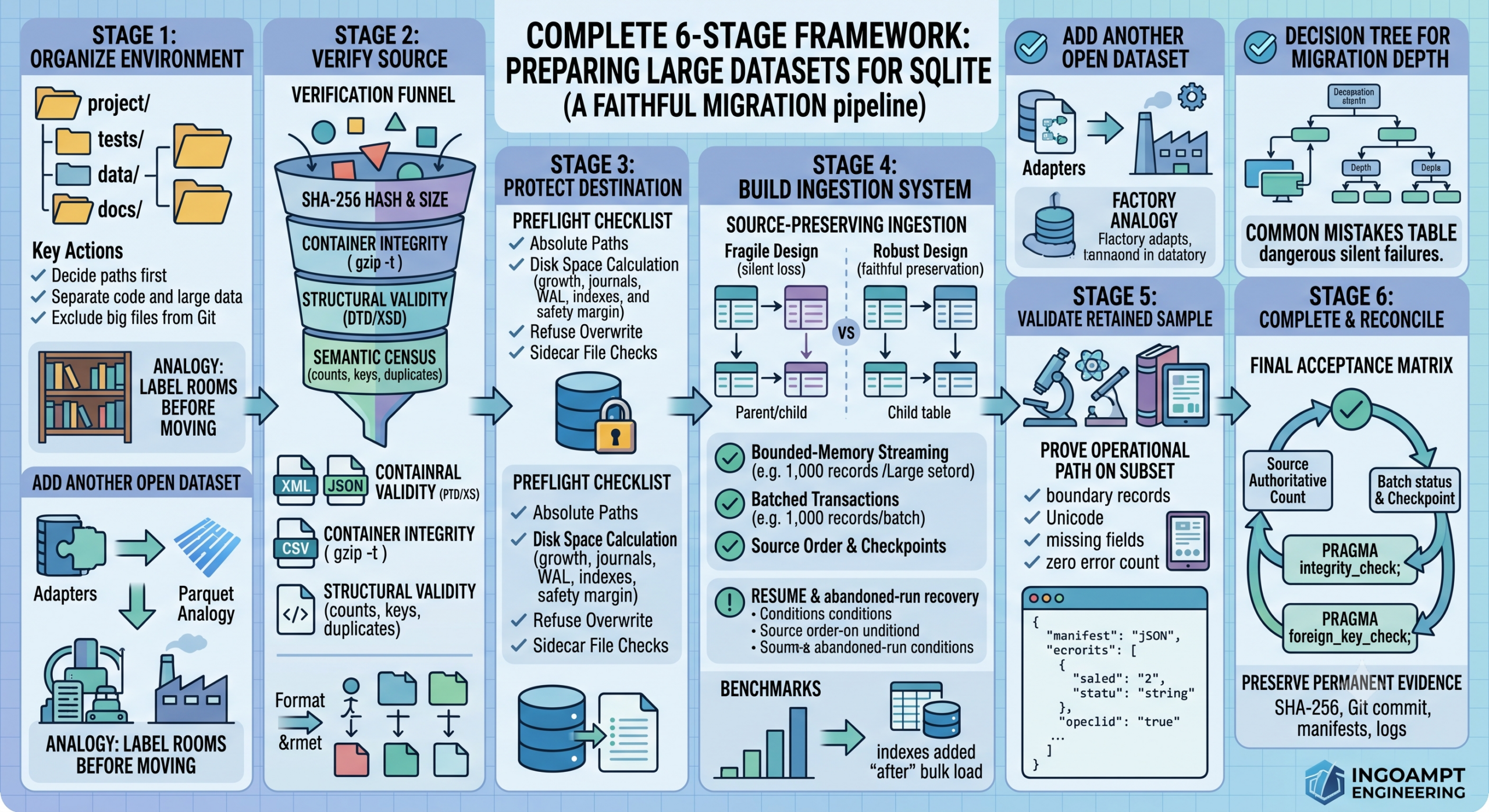
A practical six-stage framework for turning large XML, JSON, CSV, scientific, catalogue, and open-source datasets into a trustworthy relational database— without corrupting the source, running out of disk space, losing hours of work, or silently dropping records.
A data migration is not merely “reading a file and inserting rows”
Beginners often imagine a migration as one short script:
open an XML or CSV file, loop over the records, run an
INSERT statement, and wait until the script finishes.
That may work for a tiny disposable file. It is not enough for a large,
valuable, or difficult-to-replace dataset.
A serious migration is a chain of evidence. You need to prove that the source was correct, the target was safe, the mapping was intentional, the loader did not silently lose information, interruptions were recoverable, and the final database agrees with the original source.
Imagine moving a national library
You would not throw millions of books into trucks and count only the trucks. You would catalogue the shelves, seal the boxes, record their origin, check the destination building, test the route, move a small section first, then reconcile every delivered box. Large-data migration follows the same logic.
What data is worth converting to SQLite?
SQLite is a serverless relational database stored locally, usually in one main database file. It is especially useful when the data will be filtered, joined, indexed, searched repeatedly, distributed with an application, or analysed offline without maintaining a database server.
Catalogues
Books, papers, products, public records, datasets, inventories, archives and metadata collections.
Scientific data
Measurements, experiments, annotations, observations and reproducible research snapshots.
Local-first applications
Desktop, mobile, offline, embedded and single-user analytical tools that need fast local queries.
SQLite, flat files, or a server database?
| Situation | Best starting point | Why | Main warning |
|---|---|---|---|
| A 2 GB public catalogue queried locally | SQLite | Fast indexes, joins, one distributable database, no server administration | Plan bulk loading and final indexes carefully |
| A 10 MB file read once by one script | CSV or JSON may be enough | Migration overhead may exceed the benefit | Repeated scans become slow as use grows |
| Many users writing concurrently over a network | PostgreSQL / server RDBMS | Designed for centralized concurrency and access control | Requires administration and deployment |
| Append-only analytics across hundreds of gigabytes or terabytes | Parquet + analytical engine / warehouse | Columnar compression and distributed or vectorized scanning | Not as simple for row-level application use |
| Complex documents with rarely queried nested content | Original JSON/XML plus selective index | Preserves document structure with less modelling effort | Queries and joins may remain awkward |
Why convert XML, JSON or CSV to SQL at all?
| Need | Flat or hierarchical file | Relational database |
|---|---|---|
| Find all records matching several fields | Usually requires scanning or custom code | Indexed SQL query |
| Join authors, records and organizations | Manual mapping | Natural joins and foreign keys |
| Prevent duplicates | Application logic | Unique constraints and keys |
| Check required values | Separate validation program | NOT NULL and CHECK constraints |
| Search millions of records repeatedly | Repeated parsing and scanning | Indexes, FTS and query planner |
| Distribute one inspectable data package | Multiple files and implicit conventions | Database carries tables, indexes and schema |
Must every dataset go through all six stages?
Conceptually, yes: every migration should answer the six questions below. However, the depth of each answer should scale with the dataset’s size, value, replaceability and operational risk.
| Stage | Normally required? | Lightweight project | Large or production project |
|---|---|---|---|
| 1. Organize environment | Mandatory | Clear input and output folders | Separate external data root, logs, manifests, provenance and retention rules |
| 2. Verify source | Mandatory | File opens, header and row count look correct | Cryptographic hashes, schema validation, record census and source identity |
| 3. Protect destination | Mandatory | Do not overwrite the only copy | Disk-space calculation, sidecar checks, permissions, atomic deployment and explicit refusal rules |
| 4. Build robust loader | Mandatory | Simple parser and transaction | Streaming parser, source-preserving schema, checkpoints, recovery, benchmarks and tests |
| 5. Retained sample run | Strongly required | 10–100 representative records | Production-style retained sample with independent verification |
| 6. Full migration and reconciliation | Mandatory | Final row counts and spot checks | Complete reconciliation, integrity checks, foreign-key checks, manifest agreement and evidence preservation |
| Multiple SQLite profile comparisons | Situational | Use safe defaults | Benchmark when runtime, storage or durability trade-offs materially matter |
| Crash-kill integration tests | Situational | Usually unnecessary | Important when a full run lasts hours or days and cannot safely restart |
| Embeddings or search indexes | After migration | Only if the product needs them | Build after the source-preserving database is verified |
Organize the environment and evidence
Decide where the source, database, logs, code and recovery evidence belong before the first insert.
Beginner analogy: label the rooms before moving
If the original boxes, damaged boxes, delivery notes and final shelves are all mixed in one room, nobody can prove what happened. Separate locations create clarity.
The minimum directory model
project/
├── src/ # Loader and application code
├── tests/ # Automated tests
├── data/
│ └── raw/ # Original source files; never modified
└── docs/ # Design and run documentation
external-data/
├── databases/ # Large SQLite files
├── logs/ # Human-readable progress and errors
├── manifests/ # Machine-readable run metadata
├── samples/ # Retained validation databases
└── crash-snapshots/ # Evidence from interrupted runsLarge generated data should normally remain outside the Git repository. Version control should contain code, schemas, tests, documentation and small fixtures—not multi-gigabyte databases or raw dumps.
What should be recorded before migration?
Source identity
Publisher, download URL, release date, licence, file names, byte sizes and expected format.
Path identity
Resolved absolute input path, destination path, log path and manifest path.
Code identity
Git commit, branch, Python/runtime version, dependency lock file and migration configuration.
Retention rules
Which files are permanent, which are temporary, and which may never be deleted after a successful run.
Simple example
Suppose you download an 8 GB XML file containing books. A weak setup uses
books.xml and test.db on the desktop. A strong setup records:
| Item | Example value | Why it matters |
|---|---|---|
| Source file | /data/raw/library-2026.xml | Removes ambiguity about which release was imported |
| Destination | /external/databases/library-2026.sqlite3 | Protects old versions and makes deployment explicit |
| Manifest | /external/manifests/run-20260722.json | Allows tools to compare expected and actual results |
| Git commit | abc123... | Identifies the exact loader code used |
Verify the source before designing around it
Prove that the file is complete, authentic, structurally valid and understood.
Beginner analogy: check the seal before opening the package
If a file was truncated during download, every later result becomes unreliable. A checksum is like a tamper-evident seal for the exact bytes.
Four levels of source verification
| Level | Question | Typical technique | Example failure caught |
|---|---|---|---|
| 1. File identity | Is this the exact file we intended? | SHA-256, publisher checksum, byte size | An older release with the same filename |
| 2. Container integrity | Is the archive readable and complete? | gzip -t, ZIP test, decompression test |
Interrupted download or damaged archive |
| 3. Structural validity | Does it follow its declared format? | DTD/XSD, JSON Schema, CSV dialect checks | A publisher changed field nesting |
| 4. Semantic census | Does the content match our assumptions? | Record counts, key uniqueness, field/path inventory | Duplicate identifiers or missing mandatory keys |
Example checksum commands
# macOS
shasum -a 256 large_dataset.xml
# Linux
sha256sum large_dataset.xml
# Python
python -c "import hashlib, pathlib; p=pathlib.Path('large_dataset.xml'); print(hashlib.sha256(p.read_bytes()).hexdigest())"read_bytes() for multi-gigabyte files in production.
Compute the hash in chunks so memory use stays bounded.
from hashlib import sha256
from pathlib import Path
def file_sha256(path: Path, chunk_size: int = 8 * 1024 * 1024) -> str:
digest = sha256()
with path.open("rb") as source:
while chunk := source.read(chunk_size):
digest.update(chunk)
return digest.hexdigest()Why structural validation is not enough
An XML document may be perfectly valid according to its DTD while still containing unexpected duplicate identifiers. A CSV may have the correct columns while the final 20% of the download is missing. This is why source validation should combine structural checks with a content census.
Format-specific checks
| Format | Useful checks | Common trap |
|---|---|---|
| XML | Well-formedness, DTD/XSD, namespaces, element-path inventory, stable record boundary | Loading the whole tree into memory |
| JSON / NDJSON | JSON Schema, line validity, key inventory, nested-array size, encoding | Assuming every object has identical keys |
| CSV / TSV | Delimiter, quoting, newline style, header, encoding, consistent column count | Commas inside quoted text or mixed encodings |
| Parquet | Schema, row groups, statistics, nullable fields, logical types | Unexpected schema evolution across files |
| API pages | Pagination completeness, retry policy, version, rate limits, response hashes or snapshots | Silent gaps caused by failed pages |
Protect the destination before creating it
Prevent overwrites, insufficient disk space, stale sidecars and ambiguous deployments.
Beginner analogy: inspect the building before delivery trucks arrive
The source may be perfect, but the move still fails if the destination is locked, too small, already occupied, or on an unreliable disk.
Destination preflight checklist
Resolve paths
Use absolute paths and print them before the run. Never rely on an uncertain working directory.
Calculate disk needs
Include database growth, indexes, temporary files, journals or WAL, logs and a safety margin.
Refuse overwrite
A production launcher should stop if the destination database already exists unless an explicit upgrade path was designed.
Check sidecars
Look for rollback journals, -wal and -shm files because they may be part of database state.
How much free space should you reserve?
There is no universal multiplier because storage depends on text length, normalization, indexes, page size, temporary operations and journaling mode. Estimate with a sample benchmark rather than guessing.
| Component | Possible space requirement | How to estimate |
|---|---|---|
| Main tables | Core database size | Sample bytes per source record × full record count |
| Indexes | Can be substantial | Build representative indexes in the sample DB |
| Rollback journal or WAL | Temporary or persistent sidecar space | Benchmark the selected journal mode |
| Logs and manifests | Usually small, but should be retained | Estimate progress frequency and error detail |
| Safety margin | Protects against inaccurate projections | Choose a conservative project-specific threshold |
Safer deployment pattern
- Build the new database under a versioned or temporary production path.
- Complete all integrity and reconciliation checks.
- Close every connection and settle required journal or WAL state.
- Publish or rename the verified file atomically where the operating system permits.
- Retain the previous production version until the new one is accepted.
Build a source-preserving ingestion system
Design the schema, streaming parser, writer, transactions, checkpoints, recovery and benchmarks as one system.
Beginner analogy: build a conveyor belt, not a person carrying one item at a time
A robust loader has a known entry point, quality gates, grouped work, counters, checkpoints and an emergency stop. Each part supports the others.
4.1 Design the data model before writing the parser
The first question is not “How do I read XML?” It is “What information must remain recoverable after conversion?” If the relational model discards fields, attributes, ordering or identifiers that later become important, the import may be fast but incorrect.
A simple XML example
<book id="b-101" language="en">
<title>Data Pipelines for Everyone</title>
<author order="1">Ava Chen</author>
<author order="2">Noah Stein</author>
<year>2026</year>
<keyword>SQLite</keyword>
<keyword>ETL</keyword>
</book>A fragile relational design
CREATE TABLE books (
id TEXT PRIMARY KEY,
title TEXT,
author TEXT, -- only one author fits
year INTEGER
);This design silently loses the second author, the author order, language and keywords. A more faithful model separates repeatable fields.
CREATE TABLE books (
id TEXT PRIMARY KEY,
language TEXT,
title TEXT NOT NULL,
year INTEGER,
source_order INTEGER NOT NULL UNIQUE
);
CREATE TABLE book_authors (
book_id TEXT NOT NULL REFERENCES books(id),
author_order INTEGER NOT NULL,
author_name TEXT NOT NULL,
PRIMARY KEY (book_id, author_order)
);
CREATE TABLE book_keywords (
book_id TEXT NOT NULL REFERENCES books(id),
keyword_order INTEGER NOT NULL,
keyword TEXT NOT NULL,
PRIMARY KEY (book_id, keyword_order)
);4.2 Use bounded-memory parsing
A large XML document should normally be parsed incrementally. In Python,
xml.etree.ElementTree.iterparse() can emit events as elements are
read. After processing a complete record, clear the element so old subtrees do not
remain in memory.
import xml.etree.ElementTree as ET
for event, element in ET.iterparse("library.xml", events=("end",)):
if element.tag == "book":
record = parse_book(element)
write_book(connection, record)
element.clear() # release processed content4.3 Separate parsing, modelling and writing
| Layer | Responsibility | Why separation helps |
|---|---|---|
| Parser | Turns source syntax into source records | Format-specific logic remains isolated |
| Canonical/source model | Represents validated fields and provenance | Writer does not depend on XML or JSON details |
| Writer | Persists one record atomically | Database behaviour can be tested independently |
| Runner | Groups transactions, checkpoints, progress and recovery | Operational control stays outside field mapping |
| Verifier | Reconciles source and destination independently | Success is not declared by the writer itself |
4.4 Use transactions deliberately
Committing after every row forces excessive durability work. Keeping the entire multi-hour migration in one transaction makes restart and rollback impractical. Group records into measured transaction batches.
4.5 Add source order and checkpoints
A checkpoint is more than a line in a log. It should be transactionally consistent with committed data. If the checkpoint says record 100,000 is complete, the database must contain exactly the committed prefix through 100,000.
BEGIN;
-- insert a group of source records
INSERT INTO books (...);
INSERT INTO book_authors (...);
-- update checkpoint in the same transaction
UPDATE ingestion_batches
SET committed_source_order = 100000,
committed_records = 100000
WHERE batch_id = 1;
COMMIT;4.6 Design resume and abandoned-run recovery
Resume logic must not blindly trust a checkpoint. Before continuing, compare:
- the batch status;
- the maximum stored source order;
- the committed-record count;
- the checkpoint;
- the source identity and loader configuration.
| Observed state | Safe interpretation | Action |
|---|---|---|
| Batch completed and counts reconcile | Finished run | Do not resume; verify or publish |
| Batch failed and committed prefix reconciles | Recoverable interruption | Resume from first uncommitted source record |
| Batch says running, but process is definitely gone | Abandoned run | Perform explicit recovery, preserve evidence, then resume |
| Checkpoint and database disagree | Unknown or damaged state | Stop; investigate rather than guessing |
4.7 Benchmark the real path
A useful benchmark uses the real parser, schema, writer and transaction runner. It should report more than elapsed time.
Runtime
Total elapsed seconds and records per second.
Storage
Main file, sidecars, total footprint and bytes per record.
Correctness
Counts, checkpoints, constraints, integrity and foreign keys.
Recovery
Ability to continue after a controlled or real interruption.
4.8 Indexes: before or after the bulk load?
Indexes speed queries but make inserts more expensive because every inserted row may update several index trees. For a fresh bulk import, it is often efficient to create essential constraints first, load the source, verify it, then build large secondary search indexes afterward. The correct choice depends on whether an index is required for uniqueness or ingestion logic.
Run a retained production-style sample
Prove the entire operational path on a small but representative subset before the expensive run.
Beginner analogy: move one shelf before moving the library
A unit test proves individual tools work. A retained sample proves the complete process works together under realistic settings.
A sample is not merely “the first 100 rows”
The easiest records may hide the exact edge cases that break the production run. A good sample should include representative variation.
| Sample characteristic | Why include it | Example |
|---|---|---|
| Common records | Tests the dominant path | Normal article or book entries |
| Large records | Tests memory and field limits | Hundreds of authors or long abstracts |
| Missing optional fields | Tests null and absence semantics | No year or venue |
| Unicode and markup | Tests encoding and text preservation | Arabic, Persian, German, emojis, entities |
| Repeated/nested values | Tests child tables and ordering | Multiple authors, keywords and URLs |
| Boundary records | Tests first, last and checkpoint transitions | Record 1, 999, 1,000 and 1,001 |
What must the retained sample prove?
- The production launcher validates paths, source identity, free space and destination safety.
- The real schema is created with the intended SQLite settings.
- The parser and writer ingest exactly the allowed sample size.
- The checkpoint equals the final committed sample record.
- Failed-record and ingestion-error counts are zero, or every accepted exception is documented.
- Integrity and foreign-key checks pass.
- The database, log and manifest are retained for independent inspection.
Example sample manifest
{
"run_id": "20260722T090000Z",
"source_sha256": "9f...example",
"source_bytes": 8589934592,
"loader_git_commit": "abc123",
"sqlite_profile": "delete-full",
"commit_interval": 1000,
"expected_records": 1000,
"inserted_records": 1000,
"failed_records": 0,
"final_checkpoint": 1000,
"integrity_check": "ok",
"foreign_key_violations": 0,
"status": "completed"
}Why retain the sample database?
A deleted temporary sample proves very little later. A retained sample allows another developer to inspect actual tables, run verification queries, compare future schema versions and understand the storage footprint.
Execute the full migration and independently reconcile it
Use the tested configuration, monitor without interfering, then prove that the final database is complete.
Beginner analogy: count delivered books, not only successful truck journeys
A process exiting with code zero does not prove that every source record arrived. The destination must be independently counted and checked.
Before pressing “run”
Progress monitoring should answer useful questions
| Progress field | What it tells you | Example |
|---|---|---|
| Committed source order | Exact durable prefix | 4,500,000 |
| Committed records | Destination progress | 4,500,000 |
| Failed records | Whether data has been rejected | 0 |
| Elapsed time | Runtime so far | 3,520 seconds |
| Throughput | Observed ingestion rate | 1,278 records/second |
| Current source key | Human-readable location in the source | book/b-4500000 |
Independent reconciliation after completion
Do not rely only on “status: completed” written by the loader. Open the database separately in read-only mode and compare its state with the source and manifest.
-- Core record count
SELECT COUNT(*) FROM source_records;
-- Source-order range
SELECT MIN(source_order), MAX(source_order) FROM source_records;
-- Batch status and checkpoint
SELECT status, expected_records, committed_records, failed_records,
committed_source_order
FROM ingestion_batches;
-- Database structural checks
PRAGMA integrity_check;
PRAGMA foreign_key_check;PRAGMA integrity_check checks database structure and constraints such as
index consistency. Foreign-key violations require the separate
PRAGMA foreign_key_check.
Final acceptance matrix
| Evidence | Expected condition | If it fails |
|---|---|---|
| Source hash | Matches approved fingerprint | The migration does not represent the approved source |
| Expected vs inserted count | Exactly equal | Investigate missing or extra records |
| Source-order range | Complete, continuous expected range | Investigate gaps, duplicates or ordering bugs |
| Final checkpoint | Matches final source record | Batch metadata and committed data disagree |
| Failed records | Zero, unless explicitly accepted | Migration is incomplete or exceptions need review |
| Integrity check | ok | Database should not be published |
| Foreign-key check | No returned rows | Referential relationships are invalid |
| Manifest agreement | File metadata equals database state | Operational record is unreliable |
What should be preserved after success?
- the production SQLite database;
- the exact source fingerprints and release identity;
- the loader Git commit and runtime versions;
- the final manifest;
- the complete progress and console logs;
- the selected SQLite settings and transaction interval;
- the independent verification output;
- any crash snapshot or failed-attempt evidence that explains operational history.
What happens when you add another open-source library or dataset?
The new source should normally go through the same six-stage framework, but you should reuse the migration infrastructure rather than duplicate it. Think of the framework as a factory and each source as a new adapter entering that factory.
Which work is reusable and which must be repeated?
| Component | Reuse? | What changes for the new source? |
|---|---|---|
| External directory structure | Mostly reusable | Add source-specific paths and manifests |
| Source hashing framework | Reusable | New expected file sizes and hashes |
| Destination safety checks | Reusable | New database or source namespace |
| Canonical record model | Partly reusable | Map new fields; preserve source-specific extras |
| Parser | Usually source-specific | XML paths, JSON keys, CSV columns or API pagination |
| Transaction runner and checkpoints | Highly reusable | Define source-order semantics for the new source |
| Sample validation process | Reusable method | New representative edge cases |
| Full reconciliation | Repeat for every source release | New counts, keys, fingerprints and evidence |
Three common integration strategies
Separate database per source
Best when sources are independent, large or updated on different schedules.
One database, source namespaces
Best when cross-source joins matter and provenance is modelled explicitly.
Source stores + canonical index
Best when raw source fidelity and a unified search layer are both important.
A practical decision tree for any XML, JSON or CSV migration
Example decisions
| Project | Recommended approach | Reason |
|---|---|---|
| 20 MB CSV used once for a chart | Light process; maybe no SQLite | Low rebuild cost and no repeated query workload |
| 8 GB public XML catalogue for an offline search application | Full six-stage SQLite process | Large, query-heavy and expensive to rebuild |
| Daily JSON export with one local writer and many reads | SQLite with repeatable incremental or replacement pipeline | Local, structured and read-heavy |
| Live system with hundreds of simultaneous remote writers | Server RDBMS | Concurrency and central access control dominate |
| 500 GB analytical event history | Parquet/warehouse, possibly SQLite for summaries | Columnar scans are more appropriate at that scale |
Common migration mistakes and why they are dangerous
| Mistake | Why it happens | Consequence | Better practice |
|---|---|---|---|
| Starting before hashing the source | The file “looks correct” | No proof of which bytes were imported | Record size and SHA-256 first |
| Loading the whole XML tree | Simpler code examples use parse() | Memory exhaustion | Use streaming record boundaries |
| Flattening repeated fields | One wide table feels easier | Silent loss of authors, tags or order | Use child tables or a source-preserving representation |
| Committing every row | Implicit transaction behaviour is overlooked | Very poor throughput | Benchmark grouped transactions |
| One giant transaction | Maximum speed is prioritized | Huge rollback and no useful restart point | Use measured batches and checkpoints |
| Trusting only the exit code | The script did not crash | Missing records remain unnoticed | Independently reconcile counts and keys |
| Deleting failed-run artifacts | Desire for a clean folder | Loss of diagnostic evidence | Archive and label failed attempts |
| Building every index before import | Indexes are seen as always beneficial | Slower ingestion and larger transient work | Keep correctness indexes; defer derived search indexes when appropriate |
| Resuming from a log line | Log says “processed 1,000,000” | Log output may exceed committed state | Resume from transactional database checkpoints |
| Reusing old assumptions for a new source release | Filename and format seem unchanged | Schema evolution causes silent damage | Repeat fingerprint, census and representative sample checks |
Complete large-data-to-SQLite migration checklist
The checkboxes work in the browser and are intentionally not saved after closing the page.
Stage 1 — Environment
Stage 2 — Source verification
Stage 3 — Destination safety
Stage 4 — Loader engineering
Stage 5 — Retained sample
Stage 6 — Full migration
Questions beginners and experienced developers both ask
Does every XML-to-SQLite conversion require this much work?
No. A small disposable file can use a reduced process. But every migration should still identify the source, protect the destination, define the mapping, test a sample and verify the result. Large or production-critical datasets require stronger evidence and recovery.
Should I preserve the original XML or JSON after migration?
Yes, especially when it is authoritative or difficult to reproduce. The relational database is a derived representation. The original source and its fingerprint are the basis for future auditing and rebuilding.
Can I append a second open-source library to the same SQLite database?
Yes, if the schema models provenance clearly and the combined database remains operationally manageable. The new source still needs its own source verification, adapter, sample run and full reconciliation. An alternative is one source database per provider plus a shared canonical search index.
Is WAL always the fastest and best SQLite journal mode?
No. WAL can improve concurrency and may improve some workloads, but journal choice should be benchmarked with the actual environment and recovery requirements. A bulk offline migration may legitimately choose a rollback-journal mode. Record the activated settings, not only the settings you requested.
How do I choose a commit interval?
Benchmark several realistic values. Smaller batches create more durability operations but reduce rollback and replay size. Larger batches can improve throughput but increase the amount of work lost after interruption. Choose based on measured runtime, recovery granularity and correctness—not an internet number copied without testing.
Should I normalize every field into many tables?
Not automatically. Normalize repeated entities and relationships when it improves integrity and queryability. Preserve source fidelity and avoid a design so fragmented that common reads become unnecessarily complex. Some projects keep both a faithful source representation and derived query tables.
What if the source has no official checksum?
Compute and record your own SHA-256 immediately after download, along with the source URL, retrieval timestamp and file size. It will not prove publisher authenticity, but it will establish the exact bytes used in your migration.
Can pandas replace a custom ingestion pipeline?
Pandas is useful for moderate tabular data and exploration. For very large hierarchical files, strict provenance, resumable ingestion or source-preserving nested structures, a dedicated streaming pipeline is often safer and more memory-efficient.
When should I create full-text or embedding indexes?
After the authoritative source-preserving database is complete and verified, unless an index is required for ingestion correctness. Search layers are derived artifacts and should be reproducible from the verified base database.
What is the single most important rule?
Never declare success only because the importer finished. Independently reconcile the final database with the approved source and preserved run evidence.
Primary technical references
This article presents a generalized engineering framework. The following official documentation is useful when implementing the details:
| Resource | Use it for |
|---|---|
| SQLite: Appropriate Uses for SQLite | Deciding between SQLite and a client/server database |
| SQLite: Write-Ahead Logging | Understanding WAL behaviour, concurrency and checkpoints |
| SQLite: PRAGMA statements | Integrity checks, foreign-key checks and configuration |
| SQLite: Database File Format | Understanding the main file, rollback journals and WAL state |
| Python: ElementTree XML API | Incremental XML parsing with iterparse() |