
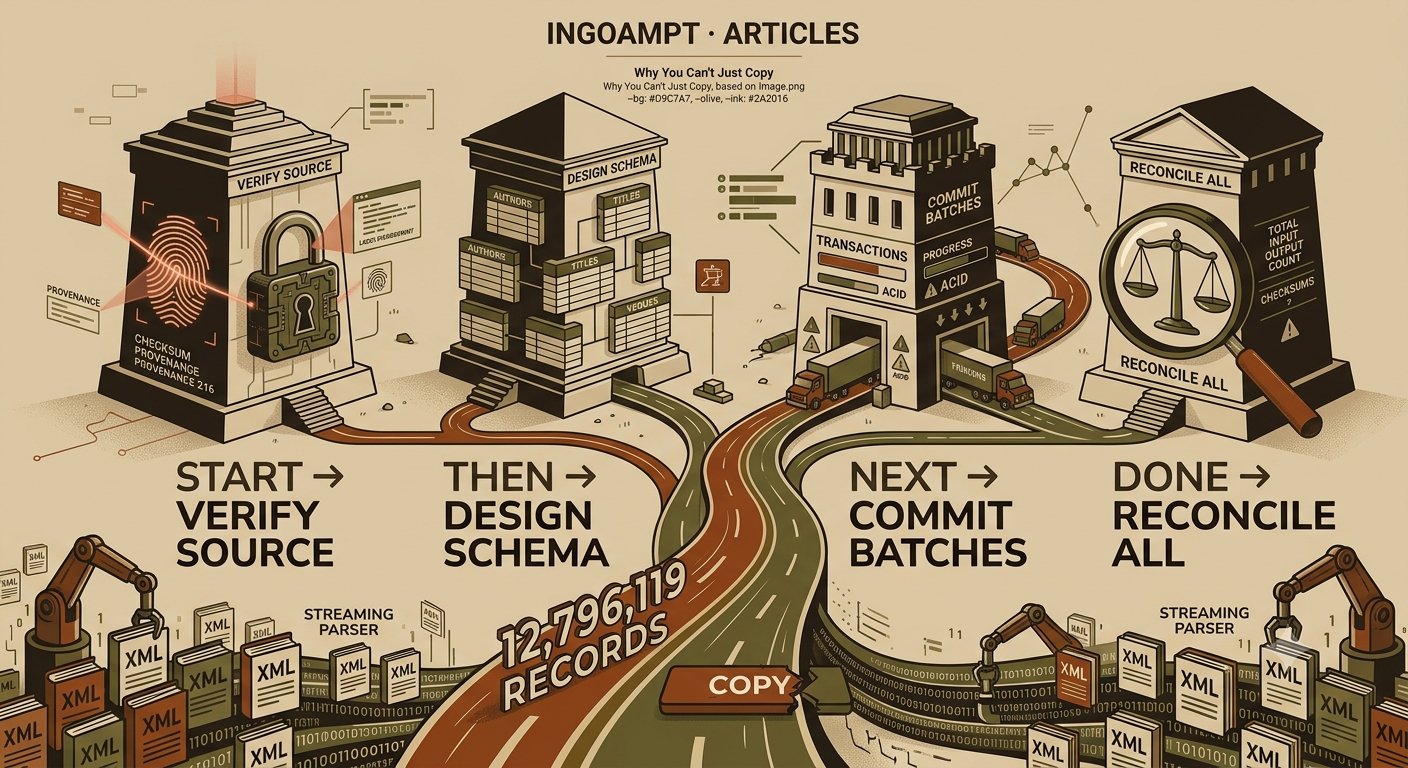
Why You Can’t Just Copy 12 Million Records
The hidden engineering of safe large-scale data migration — told through the story of moving a library of twelve million books.
There is a moment, familiar to almost anyone who has ever worked with data, when a beautifully simple plan collides with reality. You have found a treasure: a giant public dataset — the entire DBLP computer-science bibliography, say, or all of PubMed, or a Wikipedia dump — released for free as one enormous file. You want it in a database so you can query it. So you write the obvious three lines of code: open the file, parse it, insert every record. You hit “run,” lean back, and wait.
And wait. And then, three hours in, your laptop’s fan screaming, the process dies. Out of memory. Or the power blips. Or you realize the import has been silently dropping records for the last hour and you have no idea how many. You are left with a half-populated database, no idea what’s in it, and a sinking feeling that “just copy the data” was not, in fact, just copying the data.
This article is about why that happens, and what professionals do instead. It starts from absolute first principles — no database knowledge assumed — and gets progressively deeper.
Each section carries a depth label (Beginner, Intermediate, or Deep) so you can stop whenever you have what you need.
1 · The Naive View vs. Reality
Depth: Beginner
The library analogy
Imagine you have been asked to move a library. Not a small one — a library of twelve million books. Your friend, who has moved apartments a few times, says: “Easy. Pick up the books, carry them to the new building, put them on the shelves.”
That instruction is not wrong. It is exactly what you must do to each book. But it ignores every hard part of the problem: you cannot carry twelve million books at once, so you need boxes. The move takes weeks — what happens if you get sick on day four? Do you start over? And when you are done, how do you prove that all twelve million books arrived, none lost, none damaged, none duplicated?
Converting a giant data file into a queryable database is precisely this problem. The naive view — “just load the file into SQL” — is the friend saying “just carry the books.” It works fine for a shelf of fifty books (a small file). It fails catastrophically for the library (a multi-gigabyte file with millions of records).
2 · Verify the Source Before You Do Anything
Depth: Beginner → Intermediate
Before you parse a single byte, answer a deceptively basic question: did the file even download correctly? Multi-gigabyte downloads fail in quiet, nasty ways — a connection drops at 98% and you get a truncated file; a disk error flips a bit. If you build a database on a subtly broken file, every downstream step is wasted. The old adage applies in full force: garbage in, garbage out.
Checksums: the fingerprint of a file
The standard tool is the checksum (hash). A checksum function reads a file of any size and produces a short fixed-length “fingerprint.” The key property: change even a single byte of the file and the fingerprint changes completely (the avalanche effect). So the workflow is simple: the provider publishes the correct file’s fingerprint; you compute your copy’s fingerprint; compare. Match = your copy is byte-for-byte identical.
.md5
companion file for every dump). Comparing fingerprints proves your gigabytes
arrived intact before you invest hours building on them.MD5 vs. SHA-256 — which fingerprint?
| Property | MD5 | SHA-256 |
|---|---|---|
| Fingerprint size | 128 bits (32 characters) | 256 bits (64 characters) |
| Speed | Faster | Slower, still fast (~500 MB/s on a modern CPU) |
| Collision resistance | Broken — two different files CAN be crafted with the same MD5 (demonstrated 2004; exploited by the Flame malware in 2012) | No known practical collision attack |
| Good for | Catching accidental corruption (downloads) | Accidental corruption and malicious tampering |
The practical nuance: MD5 remains fine for its most common job — detecting download corruption, which is not a crafted attack. When you must defend against someone substituting a file, use SHA-256 (the standard behind TLS certificates and code signing). Recording both costs nothing extra: one streaming pass over the file can compute both at once.
Test the compression, and write down the provenance
Compressed archives carry their own built-in integrity check: gzip -t
file.gz decompresses in memory and verifies the internal CRC-32 checksum
without writing anything. A fast, free second opinion.
Finally, record provenance — the data’s origin story:
exact source URL, download date, snapshot version, verified checksum. Living
datasets change; DBLP rebuilds its XML continuously and publishes monthly
snapshots, each now registered with its own DOI (scheme 10.4230/
dblp.xml.YYYY-MM-DD) via Schloss Dagstuhl. “I used DBLP”
is unreproducible; “I used the snapshot of 2026-07-01, DOI X, MD5 Y”
is science.
3 · Streaming vs. Loading: Reading a File Bigger Than Your Memory
Depth: Intermediate
DOM parsing: the whole library on your desk
A program can read a structured file like XML in two fundamentally different ways. DOM parsing reads the entire document and builds a complete navigable tree of it in memory. Wonderfully convenient — and hopeless at scale. In the library analogy: it insists every one of the twelve million books be laid out on your desk before you begin. The memory cost is far more than the file size, because every element becomes an in-memory object with overhead. DBLP’s own documentation warns that recent versions of dblp.xml no longer fit in a standard 4 GB Java heap and recommends allocating 8 GB — just to hold the tree, before doing anything useful with it.
Streaming: one box at a time
The alternative — streaming (SAX, or iterparse in Python) — reads sequentially and hands you one record at a time: process
it, discard it, receive the next. Your desk only ever holds one box. Memory use stays
small and flat whether the file has twelve thousand records or twelve
million.
clear() each
finished record — forget that, and your “streaming” parser silently
rebuilds the whole tree anyway (the same benchmark ballooned from 23 MiB to 1.5
GB when elements weren’t released).Real-world XML ambushes: the DTD and the billion laughs
Real dumps hold two more traps. First, entities: dblp.xml is
plain ASCII and writes “Müller” as Müller,
with the meaning of ü defined in a separate grammar file
— the DTD. Parse without the DTD present, and the parser fails at
the first accented name. Second, entity-expansion limits: DBLP
contains so many entities that parsers may refuse it until you raise a security limit (its
own docs show -DentityExpansionLimit=2500000).
Why does that limit exist at all? Because of a classic attack: the billion laughs. An attacker defines entity 1 as “lol”, entity 2 as ten copies of entity 1, entity 3 as ten copies of entity 2… nine levels deep. The file is under 1 KB — but expanding it produces one billion “lol”s, nearly 3 GB, crashing the parser. Parsers therefore ship with expansion limits ON by default. The engineering judgment: understand why the guardrail exists, then knowingly raise it for a trusted file like DBLP — and never blindly disable it for input you don’t control.
4 · Schema Design: From Shapeless Dump to Tidy Tables
Depth: Intermediate → Deep
XML and JSON dumps are semi-structured: hierarchical, flexible, full of optional and repeated fields. Relational databases want rows and columns with fixed types. Bridging that gap is data modeling, and three decisions matter most:
Ordered relationships: author order is data
A publication has a list of authors, in a specific order — and in science, order carries meaning (first author, last author). Cramming names into one text field (“Alice, Bob, Carol”) destroys queryability; storing them as an unordered set destroys the order. The relational answer: a linking table with one row per (publication, author) pair plus an explicit position column (author 1, author 2, …). Tables have no inherent row order — if order matters, store it as data.
Keep the raw record: never let your projection become the only truth
Parsing is choosing: which fields, how to normalize, how to interpret. Choices can be wrong, and bugs are discovered months later. Two patterns preserve your escape hatch: (a) keep the immutable raw file (with its checksum) as the authoritative source, treating the database as a rebuildable projection; and/or (b) store the original record fragment alongside the parsed columns. Related discipline: separate authoritative values from derived ones — if you normalize an author name, keep the original string too. It is the database equivalent of showing your work.
5 · Transactional Safety — the Heart of the Matter
Depth: Deep (but the trucks are for everyone)
What is a transaction?
A transaction is a group of database operations treated as one indivisible unit: either all take effect, or none do. The classic example is a bank transfer — subtract from savings, add to checking. A crash between the two steps must not evaporate your money; the transaction guarantees the pair happens completely or un-happens completely. Databases call these guarantees ACID: Atomicity (all-or-nothing), Consistency (rules never violated), Isolation (concurrent work doesn’t collide), Durability (committed = survives a crash). For bulk loading, atomicity and durability are the stars.
The central decision: how big is each truckload?
| Approach | Speed | Crash cost | Verdict |
|---|---|---|---|
| One transaction per record | ~85/s (measured) | Lose ≤ 1 record | Too slow |
| One giant transaction | Fast | Lose EVERYTHING | Too fragile |
| Batches of ~1,000 | ≈ the fast ceiling | Lose ≤ 1 batch | ✓ Standard practice |
Two more classic accelerators: prepared statements (compile the INSERT once, reuse it 12.8M times instead of re-parsing SQL text per row) and deferred index creation (load first, build indexes after — the same benchmark measured 63,300/s for load-then-index vs. 47,700/s for index-then-load).
Journal modes and how paranoid to be
Under the hood, SQLite delivers atomicity via a journal. Two modes: the
rollback journal (default) writes the old content aside
before changing pages — a leftover journal after a crash lets it undo the incomplete
change automatically. WAL (write-ahead logging) does the
inverse: appends new changes to a side file, folding them in later —
generally faster, and readers keep working while a writer writes. Orthogonal to that,
the synchronous setting controls how forcefully each commit is
pushed to the physical disk:
| Setting | Behavior | Risk on power loss |
|---|---|---|
| synchronous = FULL (default) | Sync at every critical moment | Safest, slowest |
| WAL + synchronous = NORMAL | Sync less often | May lose the most recent commits — but never corrupts; SQLite’s docs call it “a good choice for most applications” |
| synchronous = OFF | Never wait for the disk | Fastest; database can be CORRUPTED |
The pragmatic bulk-load angle: if the database is rebuildable from the verified raw file, some practitioners deliberately relax durability during the load for speed (one documented case cut an estimated 50-hour import of ~50M records to ~17 minutes with aggressive settings), then restore safe settings for the finished product. Legitimate — only because the raw file remains the authoritative source. Never do this to data you cannot rebuild.
Checkpoints: the bookmark that defeats the time wall
Two layers of crash recovery — the database’s job and yours
When a process dies mid-write, the database’s own state heals automatically: on next open, SQLite’s journal rolls back the half-finished transaction. You write no code for this. But your application’s bookkeeping does not heal itself: if your importer marked a batch “running” and then died, that flag stays “running” forever — the process it describes is gone. Your code must detect stale “running” markers on startup and reclaim them. Forgetting this second layer is a classic source of pipelines that look busy but are dead. And one humble guard worth its five lines of code everywhere: refuse to overwrite an existing database unless explicitly told to — a re-run of a script should never silently destroy hours of completed work.
6 · Validation and Reconciliation: Trust, but Verify
Depth: Deep
We defeated memory (streaming) and time (batches + checkpoints). The third wall remains: trust. An importer can finish cleanly while being quietly, badly wrong. A parser bug might skip every record containing an unusual character. A schema mismatch might silently truncate long fields. None of these raise an error. All of them corrupt your dataset. The only defense is to actively audit the claim of success.
Reconciliation: 600-year-old wisdom
The most powerful check is reconciliation: compare an independent count of the source against what actually landed in the database. This is exactly the logic of double-entry bookkeeping, trusted by accountants since the 1400s: record everything twice, from two directions, and the totals must agree — a mismatch is a guaranteed sign of an error somewhere.
The full audit kit
Beyond the headline counts, four cheap checks close the remaining gaps:
- Key uniqueness — if every record has a supposedly unique
key, prove it:
GROUP BY key HAVING COUNT(*) > 1must return nothing. Duplicates expose either source problems or a bug in your resume logic. - Referential integrity — every author-link must point at a real
record:
PRAGMA foreign_key_checkreports each violation. (SQLite does not enforce foreign keys by default — enable them withPRAGMA foreign_keys = ON.) - Physical soundness —
PRAGMA integrity_checkwalks the entire file structure (B-trees, indexes, page links) and reports corruption; its faster cousinquick_checkcovers most of it in O(N) time. - Sampling — counts prove records exist, not that their contents are right. Pull a few hundred random records from the database, pull the same records from the raw source, compare field by field. Cheap insurance against systematic content bugs (like mangled character encoding) that counts can never reveal.
Test small first — always
Never debut new pipeline code on the full dataset. Stage it: 1,000 records (does it work at all?) → 100,000 records (does it survive scale and edge cases?) → only then the full run. Each rehearsal surfaces bugs while they cost minutes instead of hours. This is not timidity; it is how experienced engineers avoid burning an afternoon on a run that was doomed from minute one.
7 · Necessary or Overkill? The Decision Framework
Depth: Intermediate — and the most important judgment in the article
Everything above is the full production-grade treatment. A critical piece of engineering judgment — arguably the piece — is knowing when you need it and when you emphatically don’t. Building a fault-tolerant, resumable, fully-reconciled pipeline for a file you’ll parse once and delete is its own failure mode: over-engineering wastes the very time it claims to protect.
Five questions decide it
- Duration: seconds, or hours? Seconds-long jobs need no resumability — just re-run them.
- Memory: does the file fit comfortably in RAM? If yes, streaming is optional.
- Stakes: throwaway exploration, or something that a publication, product, or decision depends on?
- Rebuildability: can you regenerate the database from an authoritative source if it’s wrong?
- Reproducibility: must someone (including future you) reproduce this exact result later?
| Dimension | Quick script | Production-grade pipeline |
|---|---|---|
| Right when… | Small file, one-off, low stakes, rebuildable | Large file, repeated, high stakes, must be trusted & reproducible |
| Parsing | Load it all into memory | Stream with constant memory |
| Transactions | Autocommit is fine | Batched transactions (~1,000/commit) |
| Resumability | Just re-run from scratch | Checkpoint + resume + idempotency |
| Validation | Eyeball a few rows | Reconcile counts, integrity checks, sampling |
| Provenance | Skip it | Source, version, checksum, code commit — recorded |
| Overwrite protection | Don’t bother | Refuse to clobber |
| Time to build | Minutes | Hours to days |
Knowing what NOT to build
There is a subtler over-engineering trap: importing machinery from a different problem. One person loading a file on one laptop does not need distributed locks, ownership leases, heartbeats, multi-process coordination, or message queues. Those tools solve a problem — many machines contending for shared state — that a single-operator job simply does not have. Reaching for them “to be safe” adds complexity and delay without adding safety. A useful discipline: timebox infrastructure work in proportion to the stakes, and write down what you deliberately chose not to build. Good engineering is as much about the safeguards you consciously omit as the ones you install.
8 · How Real Projects Do It
Depth: Intermediate → Deep
The consensus SQLite bulk-load recipe
- Wrap inserts in batched transactions (~1,000–10,000 rows) — the single biggest win, worth up to a thousandfold in speed.
- Use prepared statements; bind values, don’t rebuild SQL text per row.
- Defer index creation until after the load.
- Tune PRAGMAs to the situation — aggressive throwaway-load settings only when the database is rebuildable; a safe production baseline
(
WAL+synchronous=NORMAL+foreign_keys=ON) for the finished product. - Afterward: restore safe settings, build indexes, run
integrity_checkandforeign_key_check, reconcile counts, write the provenance manifest.
What the giants’ download pages teach
The big scientific data providers have learned these lessons at scale, and their distribution formats quietly encode them:
| Dataset | Scale | The lesson encoded in its format |
|---|---|---|
| DBLP | ~8.6M publications; ~12.8M total XML records; ~1 GB compressed, ~5 GB raw | Monthly snapshots with DOIs + MD5 files → provenance and verification, institutionalized |
| PubMed/MEDLINE | >33.8M citations; baseline ~114 GB uncompressed across hundreds of files | Annual baseline + daily update files → load the base once, apply increments; process baselines before updates |
| Wikipedia (enwiki) | >25 GB compressed, >105 GB decompressed | Multistream format → random access without decompressing everything |
| OpenAlex | ~264M works; ~330 GB gzipped JSON Lines → ~1.6 TB raw | Partitioned files + manifest.json with record counts → reconciliation built into the format |
| Crossref | ~180M records; 208 GB compressed | Annual public file, many chunks → a failed piece re-fetches without redoing the world |
Notice the recurring patterns: everything ships compressed; several ship many partitioned files (batching, applied to distribution); several publish manifests with counts (reconciliation, built in); several separate baseline from updates; and several attach DOIs, checksums, and dated snapshots (reproducibility). The providers arrived at exactly this article’s checklist — from the other side.
ETL vs. ELT, demystified in one breath
Both acronyms name the same three stages — Extract (get data out of the source), Transform (clean and reshape), Load (put it in the target) — differing only in order. ETL transforms before loading: the traditional approach, right when only tidy data should land in a modest relational store. ELT loads raw data first and transforms inside a powerful cloud warehouse: the modern big-data approach, which keeps the raw around. A single-file-into-SQLite job is lightweight ETL — and the “keep the raw record” pattern from Section 4 is a nod to ELT’s core wisdom.
The provenance manifest: a lab notebook for your database
The finishing professional touch: a small record stored with the database, answering “where did this come from?” without archaeology — which source file (URL, date, checksum), which code version built it (a git commit hash), which settings (batch size, PRAGMAs, schema version), when, and how many records. Months later, when someone asks “why does this differ from the paper?”, the manifest turns a mystery into a lookup. This is why DBLP urges researchers to cite snapshots by persistent identifiers: so experiments remain reproducible in the future.
9 · The Checklist
Depth: for everyone — the whole article on one page
Before you load
- Verify the source: compute the checksum, compare against
the provider’s published value; test archives with
gzip -t. - Record provenance: source URL, download date, exact snapshot/version/DOI, checksum.
- Get the DTD / schema and any auxiliary files the format needs.
- Design the schema around the questions you’ll ask; store ordered relationships as explicit positions; keep a path back to the raw source.
While you load
- Stream, don’t slurp — and release each record
(
clear()) after processing. - Batch in transactions (~1,000–10,000/commit); prepared statements; defer indexes.
- Checkpoint for resumability; make inserts idempotent.
- Handle both recovery layers: trust the journal for automatic rollback; write explicit logic for stale “running” state.
- Refuse to overwrite an existing database without an explicit flag.
- Tune PRAGMAs to the situation — relax durability only for rebuildable data.
After you load
- Reconcile counts — independent source census vs. database, overall and per type. Exact agreement or stop.
- Check key uniqueness and referential integrity
(
PRAGMA foreign_key_check). - Run
PRAGMA integrity_checkon the finished file. - Sample and spot-compare records against the raw source.
- Test small first (1,000 → 100,000 → full) whenever pipeline code is new.
- Write the provenance manifest.
Always
- Right-size the engineering to the stakes. A throwaway exploration needs almost none of this; a reproducible research artifact or production dataset needs most of it. Don’t build distributed-systems machinery for a single-laptop job. Timebox infrastructure work.
Closing Thought
The phrase “just copy the data” hides an entire discipline. Moving twelve million records from a raw dump into a queryable database is not a copy operation; it is a small logistics campaign against three relentless adversaries — time, memory, and trust — fought with streaming parsers, batched transactions, checkpoints, checksums, and reconciliation. None of the individual ideas is hard. What is hard, and what marks the experienced engineer, is knowing which of them a given job actually needs, applying exactly those, and consciously skipping the rest. Do that well, and the library of twelve million books arrives intact, on the right shelves — with a receipt proving every one of them made it.
Further Reading
SQLite documentation — Pragma statements
(journal_mode, synchronous,
integrity_check, foreign_key_check) and
“Write-Ahead Logging” (sqlite.org) · DBLP / Schloss Dagstuhl —
“How to parse dblp.xml” and “What do I find in dblp.xml?
” FAQs; snapshot DOI announcement (dblp.org, blog.dblp.org) · OpenAlex —
snapshot data format (developers.openalex.org) · Crossref — public data files
(crossref.org) · NLM — MEDLINE/PubMed baseline distribution (nlm.nih.gov) ·
Wikipedia — “Database download”; “Billion laughs
attack”; “ACID” · Stefan Behnel — “Faster XML stream
processing in Python” (blog.behnel.de) · The classic “Improve
INSERT-per-second performance of SQLite” benchmark (widely mirrored).
Figures in this article are original illustrations. Benchmark numbers are point measurements from the cited sources; your hardware will differ — the ratios, not the absolutes, are the lesson.




Good a blog toper