
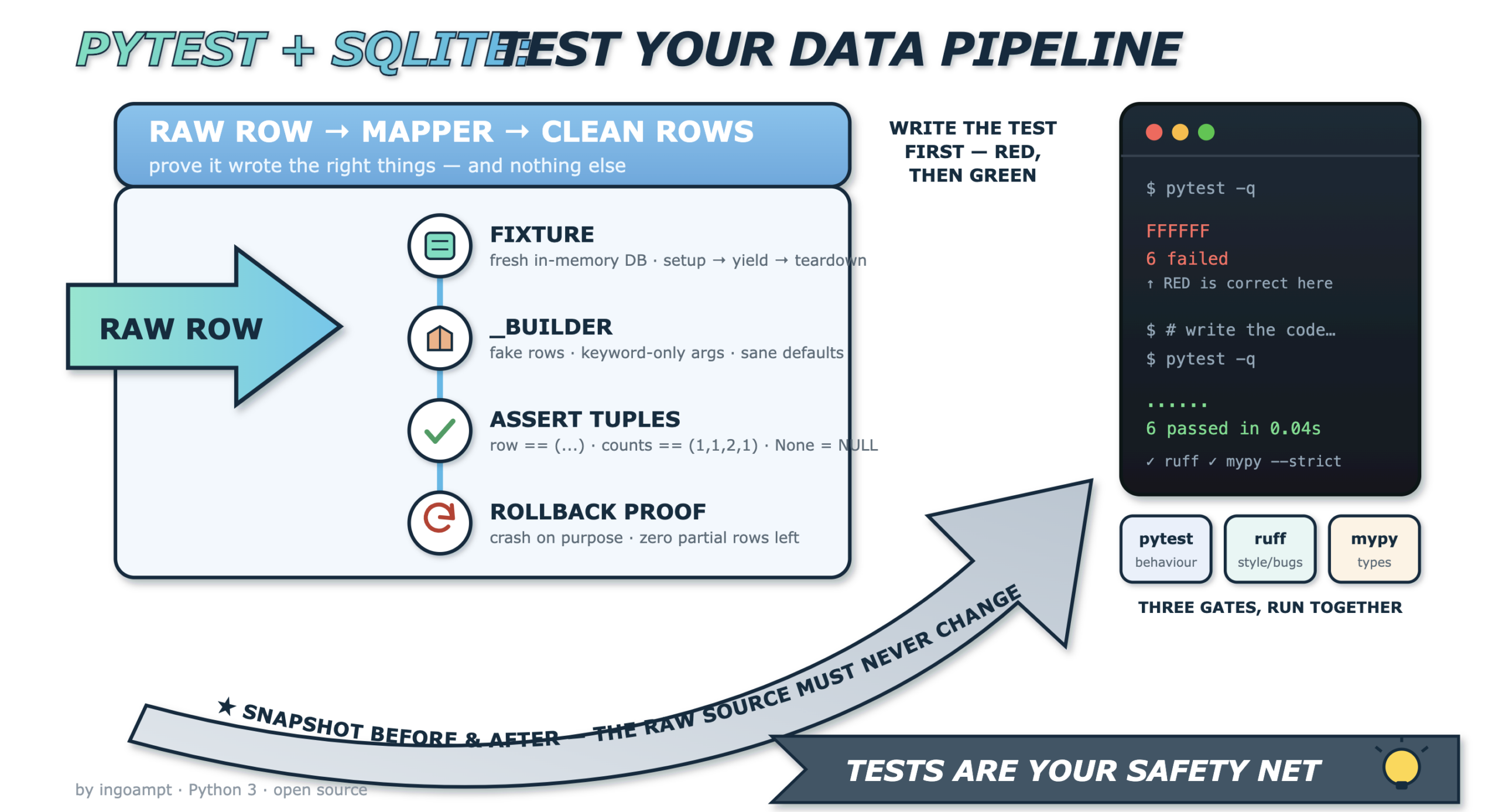
How to Write Tests for a Data-Transformation Pipeline in Python
A code-level guide you can copy into any data-cleaning project.
One running example: a family recipe archive with many messy sources.
Data pipelines fail quietly. A cleaning step keeps running, the numbers look fine, and nobody notices that one field was silently dropped. Good tests are how you catch this before it reaches production. This guide teaches you, at the code level, the exact testing patterns that real data-cleaning projects use, so you can reuse them in your own work.
The stack. Every example uses Python 3 with pytest
(the testing framework) and SQLite (a single-file SQL database that ships inside
Python through the built-in sqlite3 module). We add Ruff (a linter and
formatter) and mypy (a static type checker) as quality gates. All four tools are
free and open source. Just as important: the patterns are library-agnostic.
The last part of this article maps every pattern to alternative open-source tools, so you can swap any
piece — even the language — and keep the same ideas.
Our running example. Imagine a family recipe archive. Thousands of recipes arrive
from several sources: a typed-up grandmother’s notebook, an old recipe-website export, and a
supermarket app export. Each source names its fields differently. We keep every untouched original in a
raw_recipes table. A mapper function reads one raw row and writes a tidy row into
a clean_recipes table with shared columns. Different recipe “types” (main dish, drink,
book chapter, menu container, dataset-style entry) follow slightly different rules. That is the whole
system we will test.
1. The system under test
Before writing tests, you must know exactly what you are testing. Our system is one function:
map_recipe(connection, raw_row_id, mapping_version). It reads one row from
raw_recipes and writes tidy rows into three destination tables:
clean_recipes (the main record), clean_provenance (where the record came
from), and clean_contributors (the people credited).
Here is the two-table core layout of the shared clean schema:
| raw_recipes (untouched originals) | clean_recipes (tidy shared columns) |
|---|---|
raw_id INTEGER PK | clean_id INTEGER PK |
source_name TEXT | title TEXT |
record_type TEXT | author TEXT (nullable) |
payload TEXT (JSON blob, field names differ per source) | year INTEGER (nullable) |
source_name TEXT | |
category TEXT |
A simplified version of the mapper looks like this:
# recipe_mapper.py
import json
import sqlite3


class UnknownRecipeType(Exception):
    """Raised when a raw row uses a record_type we do not support."""


def map_recipe(conn: sqlite3.Connection, raw_row_id: int,
               mapping_version: str) -> int:
    cur = conn.cursor()
    cur.execute(
        "SELECT source_name, record_type, payload "
        "FROM raw_recipes WHERE raw_id = ?",
        (raw_row_id,),
    )
    row = cur.fetchone()
    source_name, record_type, payload_text = row
    payload = json.loads(payload_text)

    if record_type not in ("main_dish", "drink", "chapter",
                           "menu", "data_entry"):
        raise UnknownRecipeType(f"unsupported type: {record_type!r}")

    title = payload.get("title") or payload.get("name")
    author = payload.get("author")            # may be None
    year = payload.get("year")                # may be None
    category = record_type

    cur.execute(
        "INSERT INTO clean_recipes "
        "(title, author, year, source_name, category) "
        "VALUES (?, ?, ?, ?, ?)",
        (title, author, year, source_name, category),
    )
    clean_id = cur.lastrowid

    cur.execute(
        "INSERT INTO clean_provenance (clean_id, source_name, mapping_version) "
        "VALUES (?, ?, ?)",
        (clean_id, source_name, mapping_version),
    )
    for name in payload.get("contributors", []):
        cur.execute(
            "INSERT INTO clean_contributors (clean_id, name) VALUES (?, ?)",
            (clean_id, name),
        )
    # NOTE: we do NOT commit here — the caller owns the transaction.
    return clean_id
class UnknownRecipeType(Exception)— a custom error type, so tests can assert on this exact class instead of a vagueException.cur.execute("SELECT ... WHERE raw_id = ?", (raw_row_id,))— reads one raw row. The?is a parameter placeholder that prevents SQL injection and quoting bugs.payload = json.loads(payload_text)— each source stores fields differently, so the raw payload is JSON. The mapper’s job is to normalise it.- The
if record_type not in (...)guard rejects unknown types early. This is the rule we will test in section 16. payload.get("title") or payload.get("name")— different sources call the title different things..get()returnsNonewhen a key is missing, never raising.cur.lastrowid— the primary key SQLite just generated, which links the child rows.- The final comment is a real design decision: the mapper never calls
commit(). The caller decides when to save. Section 13 tests exactly this.
2. What a test actually is in Python
A pytest test is nothing fancy. It is a plain function whose name starts with test_ and
which contains at least one assert statement. If the assert holds, the test passes. If it
fails, pytest reports it. That is the entire model.
# tests/test_smoke.py
def test_two_plus_two():
    result = 2 + 2
    assert result == 4
- The file is named
test_smoke.py. pytest finds it automatically. - The function is named
test_two_plus_two. Thetest_prefix is what makes pytest collect it. assert result == 4is the check. No special API is needed.
Discovery rules. By default pytest collects files that match test_*.py
or *_test.py, functions that start with test_, and classes that start with
Test (and have no __init__ method). Anything that does not match these
patterns is silently ignored. That fact matters later: helper functions named with a leading underscore
are never mistaken for tests.
Running tests. Type pytest -q for quiet output. To run one test only,
use its node ID: pytest tests/test_smoke.py::test_two_plus_two. To run a subset
by name pattern, use -k: pytest -k "drink or menu". When you use
-k, pytest prints a line like 1 passed, 3 deselected in 0.12s. “Deselected”
means those tests exist but did not match your filter — they were skipped from selection, not failed.
| Flag | What it does |
|---|---|
-q | Quiet output — fewer lines, easier to read. |
-v | Verbose — one line per test with its full node ID. |
-x | Stop after the first failure. |
--maxfail=2 | Stop after two failures. |
-k "expr" | Run only tests whose name matches the expression. |
--collect-only | List the tests without running them (shows generated IDs). |
-ra | Show a short summary of all non-passing results at the end. |
-l | Show local variable values in tracebacks. |
3. Why assert is enough in pytest
In many frameworks you must learn a family of methods: assertEqual,
assertTrue, assertIn, and so on. pytest lets you use Python’s own
assert keyword instead, and still get a rich failure message. It does this with a feature
called assertion rewriting.
assert lines as it imports the
test file, so on failure it can print the actual value next to the expected value.
Compare the two styles. First, pytest:
def test_title_pytest():
    row = ("main_dish", "Lemon Soup", 2019)
    assert row == ("main_dish", "Lemon Soup", 2020)
Now the unittest equivalent, which needs a method and a test class:
import unittest

class TestTitle(unittest.TestCase):
    def test_title_unittest(self):
        row = ("main_dish", "Lemon Soup", 2019)
        self.assertEqual(row, ("main_dish", "Lemon Soup", 2020))
Both work. But the pytest version reads like ordinary Python. When the pytest assert fails, the output shows you exactly where the tuples differ:
    def test_title_pytest():
        row = ("main_dish", "Lemon Soup", 2019)
>       assert row == ("main_dish", "Lemon Soup", 2020)
E       assert ('main_dish', 'Lemon Soup', 2019) == ('main_dish', 'Lemon Soup', 2020)
E
E         At index 2 diff: 2019 != 2020
E         Use -v to get more diff

tests/test_title.py:3: AssertionError
========================= short test summary info ==========================
FAILED tests/test_title.py::test_title_pytest - assert ('main_dish', ...
========================== 1 failed in 0.03s ===============================
The line At index 2 diff: 2019 != 2020 tells you the third element is wrong, without any
extra code from you. This is why, in pytest projects, plain assert is the idiomatic choice.
4. Fixtures: set up once, clean up automatically
Most database tests need the same starting point: an empty database with the schema applied. A
fixture is a function decorated with @pytest.fixture that prepares this for you.
Your test asks for the fixture simply by naming it as a parameter — pytest injects the value. This is
dependency injection: the test declares what it needs, and pytest provides it.
# tests/conftest.py
import sqlite3
import pytest

SCHEMA = """
CREATE TABLE raw_recipes (
    raw_id INTEGER PRIMARY KEY, source_name TEXT,
    record_type TEXT, payload TEXT);
CREATE TABLE clean_recipes (
    clean_id INTEGER PRIMARY KEY, title TEXT, author TEXT,
    year INTEGER, source_name TEXT, category TEXT);
CREATE TABLE clean_provenance (
    prov_id INTEGER PRIMARY KEY, clean_id INTEGER,
    source_name TEXT, mapping_version TEXT);
CREATE TABLE clean_contributors (
    contrib_id INTEGER PRIMARY KEY, clean_id INTEGER, name TEXT);
"""


@pytest.fixture
def conn():
    connection = sqlite3.connect(":memory:")
    connection.executescript(SCHEMA)
    yield connection
    connection.close()
- The file is
conftest.py. pytest auto-discovers it, so fixtures defined here are available to every test file without an import. sqlite3.connect(":memory:")creates a brand-new database that lives only in RAM. It never touches your disk.executescript(SCHEMA)runs all theCREATE TABLEstatements at once.yield connectionhands the ready connection to the test. Everything beforeyieldis setup; everything after is teardown.connection.close()runs after the test finishes, even if it failed. The in-memory database then vanishes completely.
A test uses it like this:
def test_connection_is_empty(conn):
    count = conn.execute("SELECT COUNT(*) FROM clean_recipes").fetchone()[0]
    assert count == 0
yield always runs as teardown.Why a throwaway database? Four reasons: speed (RAM is fast, no disk I/O),
isolation (each test gets a fresh, empty database, so tests cannot interfere), repeatability
(the same start state every run), and safety (you can never damage real data). Fixture
scope controls how often setup runs. The default is function scope — a fresh
database per test. You can widen it with @pytest.fixture(scope="module") or
"session" for expensive read-only resources.
tmp_path gives a unique temporary folder for file tests. capsys captures
print output so you can assert on it. monkeypatch safely replaces functions or
environment variables and undoes the change afterwards (see section 12).
5. Synthetic test data builders
Tests need input data. Copy-pasting the same dictionary into ten tests is a trap: when the shape changes, you edit ten places and miss one. Instead, write a small builder — a private helper that returns a ready-made record with sensible defaults, and lets each test override only what it cares about.
# tests/test_mapper.py
import json


def _synthetic_recipe(*, record_type, include_source=True, empty_source=False):
    payload = {
        "title": "Lemon Soup",
        "author": "Grandma Rosa",
        "year": 2019,
        "contributors": ["Grandma Rosa", "Aunt Mira"],
    }
    if empty_source:
        source = ""
    elif include_source:
        source = "notebook"
    else:
        source = None
    return {
        "source_name": source,
        "record_type": record_type,
        "payload": json.dumps(payload),
    }
- The name starts with an underscore:
_synthetic_recipe. pytest only collects functions that start withtest_, so this helper is never mistaken for a test. - The bare
*in the signature makes every following argument keyword-only. You must call_synthetic_recipe(record_type="drink"), never_synthetic_recipe("drink"). This prevents mixing up arguments and makes call sites read like sentences. - Sensible defaults (
"Lemon Soup", year 2019) mean a test that does not care about those values does not have to mention them. - Flags like
empty_sourceandinclude_sourcelet one builder produce many edge cases: a present source, a missing source, and an empty-string source.
| Call | Result |
|---|---|
_synthetic_recipe(record_type="main_dish") | source = “notebook” |
_synthetic_recipe(record_type="drink", include_source=False) | source = None (SQL NULL) |
_synthetic_recipe(record_type="drink", empty_source=True) | source = “” (empty string) |
Builders beat copy-pasted literals because they give you one place to change the shape, readable call sites that highlight only the interesting difference, and fewer accidental typos across tests.
6. Immutable test objects and dataclasses.replace()
Sometimes it is cleaner to model your test input as a typed object rather than a dictionary. Python’s
@dataclass does this with almost no boilerplate. Making it frozen means it cannot
be changed after creation — which is exactly what you want in tests, so one test can never accidentally
mutate shared data used by another.
from dataclasses import dataclass, replace


@dataclass(frozen=True, slots=True)
class RawRecipe:
    source_name: str
    record_type: str
    title: str
    year: int


BASE = RawRecipe(
    source_name="notebook", record_type="main_dish",
    title="Lemon Soup", year=2019,
)

# Build a variant without touching BASE:
DRINK = replace(BASE, record_type="drink", title="Iced Tea")
frozen=Truemakes instances read-only. TryingBASE.year = 2020raisesFrozenInstanceError. Your base data is protected.slots=True(available since Python 3.10) stores fields in a fixed layout instead of a per-instance dictionary. It uses less memory and blocks typo attributes likeBASE.yaer.replace(BASE, record_type="drink", title="Iced Tea")returns a new object with those two fields changed.BASEitself is untouched.
replace() for each variant is the object-oriented cousin of the builder
in section 5. Both express “same thing, one field different” clearly and safely.
7. Asserting on database rows
After the mapper runs, you must check what it wrote. In sqlite3,
cursor.fetchone() returns a single row as a tuple, and
cursor.fetchall() returns a list of tuples. The strongest, most readable assertion
compares the whole tuple at once.
def test_maps_main_dish(conn):
    conn.execute(
        "INSERT INTO raw_recipes (raw_id, source_name, record_type, payload) "
        "VALUES (?, ?, ?, ?)",
        (1, "notebook", "main_dish",
         '{"title": "Lemon Soup", "year": 2019}'),
    )

    map_recipe(conn, raw_row_id=1, mapping_version="v1")

    row = conn.execute(
        "SELECT category, title, year, author FROM clean_recipes"
    ).fetchone()
    assert row == ("main_dish", "Lemon Soup", 2019, None)
- We insert one raw row whose payload has a title and year but no author.
- We run the mapper.
fetchone()returns the written row as a tuple.assert row == ("main_dish", "Lemon Soup", 2019, None)checks all four columns in one line. If any value is wrong, pytest shows the exact index that differs (section 3).
None means SQL NULL — “no value was recorded.” That is
different from an empty string "" (“recorded, but blank”) and from 0
(“recorded, and the number is zero”). Confusing them causes real data bugs. Test the difference on
purpose.
| Value | Python | Meaning | When it appears |
|---|---|---|---|
| NULL | None | No value at all — unknown or absent | Field missing from the source payload |
| Empty string | "" | A value exists but has zero characters | Source had the field but left it blank |
| Zero | 0 | A real number whose value is zero | A count or price that is genuinely 0 |
| “unknown” | "unknown" | A literal placeholder word | A source that fills blanks with text |
8. Counting rows across many tables in one assertion
A mapper can be wrong in two ways: it can write too little, or it can write too much. To catch both, count the rows in every table and compare all counts at once with a single tuple assertion.
def _table_counts(conn):
    def n(table):
        return conn.execute(f"SELECT COUNT(*) FROM {table}").fetchone()[0]
    return (
        n("raw_recipes"), n("clean_recipes"),
        n("clean_contributors"), n("clean_provenance"),
    )


def test_counts_after_mapping(conn):
    conn.execute(
        "INSERT INTO raw_recipes VALUES (1, 'notebook', 'main_dish', ?)",
        ('{"title": "Lemon Soup", "contributors": ["Rosa", "Mira"]}',),
    )
    map_recipe(conn, raw_row_id=1, mapping_version="v1")
    assert _table_counts(conn) == (1, 1, 2, 1)
_table_countsreturns one tuple: raw rows, clean recipes, contributors, provenance.- The assertion
(1, 1, 2, 1)says: the raw row still exists, one clean recipe was written, two contributors were written, and one provenance row was written. - If the mapper wrongly wrote a second recipe, the second number would become
2and the test would fail — proving “nothing was written where it shouldn’t be.”
9. Before/after snapshots
The golden rule of a raw-to-clean pipeline: the raw source must never be modified. To prove it, take a snapshot of the raw row before the mapper runs, take another after, and assert they are identical.
def _snapshot(conn, raw_row_id):
    return conn.execute(
        "SELECT raw_id, source_name, record_type, payload "
        "FROM raw_recipes WHERE raw_id = ?",
        (raw_row_id,),
    ).fetchone()


def test_raw_row_is_never_modified(conn):
    conn.execute(
        "INSERT INTO raw_recipes VALUES (1, 'notebook', 'main_dish', ?)",
        ('{"title": "Lemon Soup"}',),
    )
    before = _snapshot(conn, 1)

    map_recipe(conn, raw_row_id=1, mapping_version="v1")

    after = _snapshot(conn, 1)
    assert after == before
_snapshotreads the raw row into a plain tuple — a comparable structure.beforecaptures the state before mapping.aftercaptures it again after mapping.assert after == beforeproves the mapper only read the source; it did not change it.
In data pipelines this is critical. If a bug ever rewrites a source row, you lose the ability to re-run the pipeline from clean originals. A snapshot test is your safety net.
10. Parametrised tests: one test, many cases
Missing fields and empty fields are two variations of the same idea. Instead of writing two nearly
identical tests, write one and feed it a list of cases with @pytest.mark.parametrize. Use
pytest.param(..., id="...") to give each case a readable name.
import pytest


@pytest.mark.parametrize(
    "payload, expected_author",
    [
        pytest.param('{"title": "Soup"}', None, id="missing-author"),
        pytest.param('{"title": "Soup", "author": ""}', "", id="empty-author"),
    ],
)
def test_author_field(conn, payload, expected_author):
    conn.execute(
        "INSERT INTO raw_recipes VALUES (1, 'notebook', 'main_dish', ?)",
        (payload,),
    )
    map_recipe(conn, raw_row_id=1, mapping_version="v1")
    author = conn.execute("SELECT author FROM clean_recipes").fetchone()[0]
    assert author == expected_author
- The first string names the parameters:
"payload, expected_author". - Each
pytest.param(...)is one case. Theid=gives it a human name. - pytest runs the function twice, once per case. Output shows
test_author_field[missing-author]andtest_author_field[empty-author]. - You can run just one:
pytest -k "missing-author".
| Case id | Payload | Expected author |
|---|---|---|
| missing-author | {"title": "Soup"} | None (NULL) |
| empty-author | {"title": "Soup", "author": ""} | "" (empty) |
11. Negative tests: proving bad input fails correctly
Good code fails on purpose when input is wrong. To test that, use
with pytest.raises(...). It asserts that the code inside the block raises the expected
error. Add match= to also check the error message with a regular expression.
def test_unknown_type_raises_and_writes_nothing(conn):
    conn.execute(
        "INSERT INTO raw_recipes VALUES (1, 'app', 'spaceship', '{}')",
    )

    with pytest.raises(UnknownRecipeType, match=r"unsupported type"):
        map_recipe(conn, raw_row_id=1, mapping_version="v1")

    # And prove nothing leaked into the clean tables:
    assert _table_counts(conn) == (1, 0, 0, 0)
pytest.raises(UnknownRecipeType, ...)passes only if that exact error type is raised.match=r"unsupported type"checks that the message contains this text (regex search).- After the error, we assert the counts are
(1, 0, 0, 0)— the raw row survives and no clean rows were written.
match= loose and stable.
12. Replacing behaviour during a test
Sometimes your code calls something slow or external — a network service, a clock, a random generator.
In a test you want to replace it with a predictable fake. pytest’s monkeypatch fixture does
this and automatically undoes the change when the test ends.
import recipe_mapper


def test_mapping_version_uses_default(conn, monkeypatch):
    def fake_current_version():
        return "v-test-fixed"

    monkeypatch.setattr(
        recipe_mapper, "current_version", fake_current_version
    )

    conn.execute(
        "INSERT INTO raw_recipes VALUES (1, 'notebook', 'main_dish', ?)",
        ('{"title": "Soup"}',),
    )
    recipe_mapper.map_recipe_auto(conn, raw_row_id=1)

    version = conn.execute(
        "SELECT mapping_version FROM clean_provenance"
    ).fetchone()[0]
    assert version == "v-test-fixed"
fake_current_versionis a tiny stand-in that always returns a fixed value.monkeypatch.setattr(module, "name", fake)swaps the real function for the fake, for this test only.- After the test, pytest restores the original automatically. Other tests are unaffected.
13. Transaction and rollback tests
A transaction is a group of database changes that either all succeed or all fail together.
That “all-or-nothing” property is called atomicity. You end a transaction with
COMMIT (save) or ROLLBACK (undo). SQLite also supports savepoints —
named checkpoints inside a transaction you can roll back to with ROLLBACK TO SAVEPOINT.
Our mapper deliberately does not commit — it leaves that to the caller. We should test that
promise. Python’s sqlite3 exposes connection.in_transaction, which is
True while changes are pending and not yet committed.
def test_mapper_does_not_commit(conn):
    conn.execute(
        "INSERT INTO raw_recipes VALUES (1, 'notebook', 'main_dish', ?)",
        ('{"title": "Soup"}',),
    )
    map_recipe(conn, raw_row_id=1, mapping_version="v1")

    # The mapper wrote rows but did not commit them:
    assert conn.in_transaction is True


def test_rollback_removes_clean_rows_but_keeps_raw(conn):
    conn.execute(
        "INSERT INTO raw_recipes VALUES (1, 'notebook', 'main_dish', ?)",
        ('{"title": "Soup"}',),
    )
    conn.commit()                      # the raw row is safely saved

    map_recipe(conn, raw_row_id=1, mapping_version="v1")
    conn.rollback()                    # undo everything since last commit

    assert _table_counts(conn) == (1, 0, 0, 0)
- In the first test,
conn.in_transaction is Trueproves the mapper left an open transaction — it did not save on your behalf. - In the second test, we commit the raw row first so it is permanent.
- After mapping,
conn.rollback()undoes the clean writes. - The counts
(1, 0, 0, 0)prove the clean rows vanished while the committed raw row survived. That is atomicity in action.
sqlite3.connect(":memory:", isolation_level=None) to switch off implicit
transactions. Then you issue BEGIN, SAVEPOINT, RELEASE, and
ROLLBACK yourself — useful when you want to test savepoint behaviour precisely.
14. Forcing a failure on purpose
You can only trust that your pipeline recovers from a mid-write crash if you have actually seen it
crash. A neat trick with SQLite: create a temporary trigger that raises an error partway
through writing. RAISE(ABORT, 'boom') cancels the current statement and returns an error.
def test_no_partial_rows_when_contributors_fail(conn):
    conn.execute(
        "INSERT INTO raw_recipes VALUES (1, 'notebook', 'main_dish', ?)",
        ('{"title": "Soup", "contributors": ["Rosa"]}',),
    )
    conn.commit()

    conn.execute(
        "CREATE TRIGGER boom BEFORE INSERT ON clean_contributors "
        "BEGIN SELECT RAISE(ABORT, 'boom'); END;"
    )

    with pytest.raises(sqlite3.IntegrityError):
        map_recipe(conn, raw_row_id=1, mapping_version="v1")

    conn.rollback()
    assert _table_counts(conn) == (1, 0, 0, 0)
- We save a raw row, then install a trigger that fires before any insert into
clean_contributors. - The trigger calls
RAISE(ABORT, 'boom'), which stops the insert and surfaces as a Pythonsqlite3.IntegrityError. - The mapper had already inserted the recipe and provenance rows before hitting the contributor insert. This simulates a partial write.
- After
rollback(), the counts prove no partial clean rows survived. The pipeline is safe to retry.
15. Test-Driven Development in practice
Test-Driven Development (TDD) flips the usual order: you write the test first, watch it fail, then write just enough code to make it pass. Kent Beck, who popularised TDD in Test-Driven Development: By Example, put the rule simply: “write new code only if an automated test has failed.” The loop is called red → green → refactor.
Say you are adding the “drink” type. You write six tests first. They should fail, because the code does not handle drinks yet:
========================== short test summary info ==========================
FAILED tests/test_drink.py::test_drink_category
FAILED tests/test_drink.py::test_drink_optional_source
FAILED tests/test_drink.py::test_drink_counts
FAILED tests/test_drink.py::test_drink_year
FAILED tests/test_drink.py::test_drink_author
FAILED tests/test_drink.py::test_drink_provenance
========================== 6 failed in 0.05s ===============================
Then you write the drink-handling code and run again:
========================== 6 passed in 0.04s ===============================
16. Growing coverage one record type at a time
Do not try to support every recipe type in one giant push. Add one or two types per iteration, each with its own tests. This keeps every change small, reviewable, and safe.
| Raw type | Maps to | Special rule |
|---|---|---|
| main_dish | recipe | Standard mapping; author optional. |
| drink | recipe | Source is optional; may be NULL. |
| chapter | recipe linked to parent | Stores a parent book reference. |
| menu | collection / container | Groups several recipes; no single title. |
| data_entry | dataset | Structured record; strict field types. |
Alongside the supported types, always keep a guard test that proves unknown types are refused and write nothing:
def test_refuses_unknown_type(conn):
    conn.execute(
        "INSERT INTO raw_recipes VALUES (1, 'app', 'hologram', '{}')",
    )
    with pytest.raises(UnknownRecipeType):
        map_recipe(conn, raw_row_id=1, mapping_version="v1")
    assert _table_counts(conn) == (1, 0, 0, 0)
- An unsupported type (
hologram) must raiseUnknownRecipeType. - The counts prove the guard fired before any write happened.
- This “refuses the unknown” test protects you when a new source appears with a type you have not mapped yet — it fails loudly instead of silently dropping data.
17. Quality gates around the tests
Tests check behaviour. Two more tools check the code itself. Ruff lints and formats; mypy checks types. Run all three in continuous integration (CI) so no broken change merges.
Ruff is backed by Astral and, per Ruff’s official docs (docs.astral.sh/ruff), is “an extremely fast Python linter and code formatter, written in Rust.” It “supports over 900 lint rules” and “can be used to replace Flake8 (plus dozens of plugins), Black, isort, pydocstyle, pyupgrade, autoflake, and more.” It runs in milliseconds, which is why teams add it as a pre-commit hook.
mypy reads your type hints and finds type mistakes without running the code. Per the
mypy command-line docs (mypy.readthedocs.io), --strict turns on a curated set of checks
including --disallow-any-generics, --disallow-untyped-calls,
--disallow-untyped-defs, --disallow-incomplete-defs,
--check-untyped-defs, --warn-redundant-casts,
--warn-unused-ignores, --warn-return-any,
--no-implicit-reexport, --strict-equality, and --extra-checks.
Note that --warn-unreachable is not automatically enabled by strict.
Here is a bug mypy catches but tests might miss. Before:
def clean_year(payload: dict) -> int:
    return payload.get("year")      # BUG: .get can return None
mypy reports: error: Incompatible return value type (got "int | None",
expected "int"). The fix:
def clean_year(payload: dict) -> int | None:
    return payload.get("year")      # honest: it may be None
In CI, run them together so any one failing blocks the merge:
pytest -q && ruff check . && mypy --strict recipe_mapper.py
| Tool | Job | Catches |
|---|---|---|
| pytest | Runs your tests | Wrong behaviour and wrong output |
| Ruff | Lints and formats | Unused imports, style issues, common bugs |
| mypy | Static type checking | Type mismatches, e.g. int vs None |
Swap any piece: alternative open-source tools
Every pattern here is library-agnostic. Here is how each piece maps to other free tools, so you can adapt the approach to your own stack.
| Pattern in this guide | Alternatives |
|---|---|
| pytest as the runner | unittest — Python’s standard-library framework; needs no install and uses test classes. |
plain assert | unittest‘s assertEqual,
assertTrue, assertIn methods — more verbose, but explicit. |
| hand-written builders | factory_boy (declarative object factories), Faker (realistic fake values), Hypothesis (property-based testing that generates many inputs to find edge cases). |
| pytest fixtures | unittest‘s setUp/tearDown
methods. |
| in-memory SQLite | testcontainers or pytest-postgresql
for a real Postgres in tests; DuckDB in-memory (:memory:) for
analytics-heavy, columnar workloads. |
| dataframe pipelines | Validate pandas/Polars frames with pandera (schema types), Great Expectations (declarative expectations + data docs), or Soda Core (YAML checks). |
| SQL transformation projects | dbt tests — assertions such as
not_null, unique, and accepted_values that live next to your SQL
models. |
| other languages | JUnit (Java), Jest or
Vitest (JavaScript), RSpec (Ruby), and Go’s built-in
testing package. |
18. A reusable checklist for any data project
Apply these in order to any new raw-to-clean pipeline:
- Define the system under test — one function, clear inputs and outputs.
- Set up a fresh in-memory database per test with a fixture.
- Write private
_buildersfor synthetic input; use keyword-only arguments. - Assert on whole row tuples, being precise about NULL vs “” vs 0.
- Use a
_table_countshelper to prove the right rows — and only those — were written. - Take before/after snapshots to prove the raw source is never modified.
- Parametrise the “missing field” and “empty field” variations.
- Write negative tests with
pytest.raisesand a loosematch=. - Monkeypatch only the slow or external edges, never the core logic.
- Test the transaction contract: does the mapper commit, or leave it to the caller?
- Force a mid-write failure with a trigger and prove no partial rows remain.
- Add one record type per iteration, red first, then green.
- Keep a “refuses unknown types” guard test.
- Run
pytest && ruff check && mypy --strictin CI.
Copy this skeleton into a new project to get started fast:
# tests/conftest.py
import sqlite3
import pytest

SCHEMA = """ ... your CREATE TABLE statements ... """


@pytest.fixture
def conn():
    connection = sqlite3.connect(":memory:")
    connection.executescript(SCHEMA)
    yield connection
    connection.close()


# tests/test_pipeline.py
import json
import pytest
from mypipeline import transform, UnknownType


def _synthetic_row(*, record_type, include_source=True):
    source = "sourceA" if include_source else None
    payload = {"title": "Example", "year": 2020}
    return (source, record_type, json.dumps(payload))


def _table_counts(conn):
    def n(t):
        return conn.execute(f"SELECT COUNT(*) FROM {t}").fetchone()[0]
    return (n("raw_table"), n("clean_table"))


def test_happy_path(conn):
    conn.execute(
        "INSERT INTO raw_table (source_name, record_type, payload) "
        "VALUES (?, ?, ?)",
        _synthetic_row(record_type="main"),
    )
    transform(conn, raw_row_id=1, version="v1")
    row = conn.execute(
        "SELECT title, year FROM clean_table"
    ).fetchone()
    assert row == ("Example", 2020)
    assert _table_counts(conn) == (1, 1)


def test_unknown_type_writes_nothing(conn):
    conn.execute(
        "INSERT INTO raw_table (source_name, record_type, payload) "
        "VALUES (?, ?, ?)",
        _synthetic_row(record_type="alien"),
    )
    with pytest.raises(UnknownType):
        transform(conn, raw_row_id=1, version="v1")
    assert _table_counts(conn) == (1, 0)
Frequently asked questions
- Do I need to install pytest, or is it built in?
- pytest is a separate package:
pip install pytest. If you want zero installs, Python’s standard-libraryunittestworks too, but pytest’s plain-assertstyle is simpler for most teams. - Why SQLite and not a “real” database?
sqlite3ships with Python and runs entirely in memory, so tests are fast, isolated, and safe. For features specific to Postgres, use testcontainers or pytest-postgresql instead — the test patterns stay identical.- What does “N passed, M deselected” mean?
- It appears when you filter with
-k. “Passed” is how many selected tests succeeded; “deselected” is how many tests exist but did not match your filter. Deselected tests did not fail — they just were not run. - Why keep helper functions with a leading underscore?
- pytest only collects functions whose names start with
test_. A helper like_synthetic_recipeis never mistaken for a test, so it will not run on its own or clutter your results. - When should I use
monkeypatchversus a real object? - Use it to replace slow or external things (network, clock, randomness). Keep your core logic and database real, or your test will only verify your fakes.
- How is NULL different from an empty string in tests?
- NULL (
Nonein Python) means “no value recorded.” An empty string""means “a value was recorded, and it is blank.” They behave differently in SQL queries, so assert on the exact one you expect. - Should I write the test before the code?
- TDD says yes: write a failing test first (red), make it pass (green), then clean up (refactor). Seeing it fail first proves the test can actually catch a bug.
- Do Ruff and mypy replace tests?
- No. Ruff checks style and common mistakes; mypy checks types; tests check behaviour. They catch different problems, so run all three together in CI.