From Messy Data to Searchable Data
A friendly, beginner-friendly story about how a giant pile of recipes becomes a search box — by ingoampt
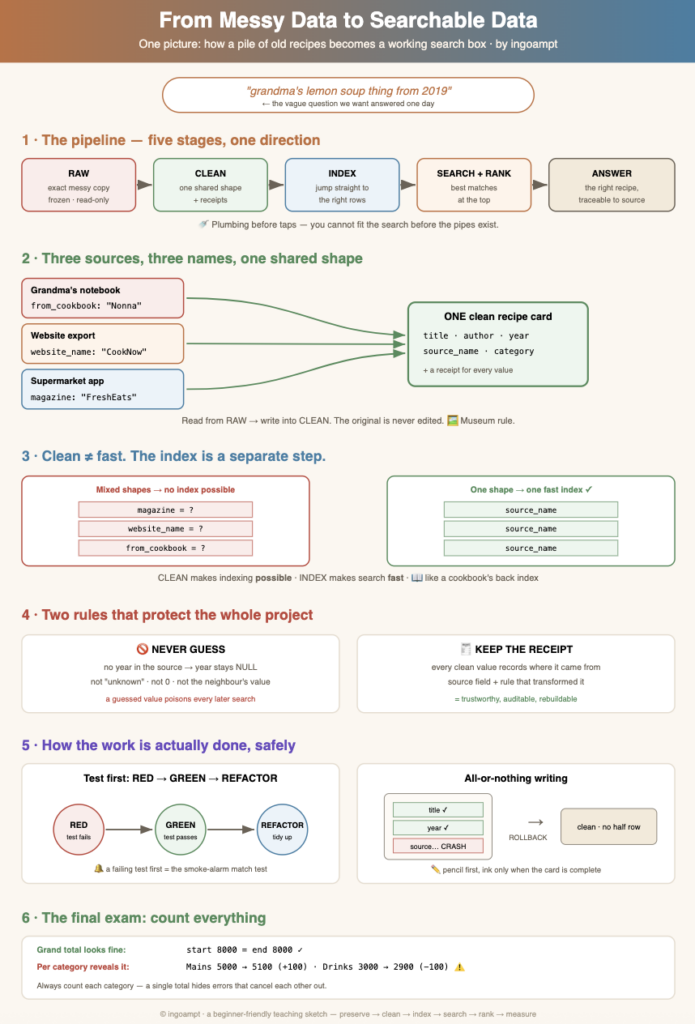
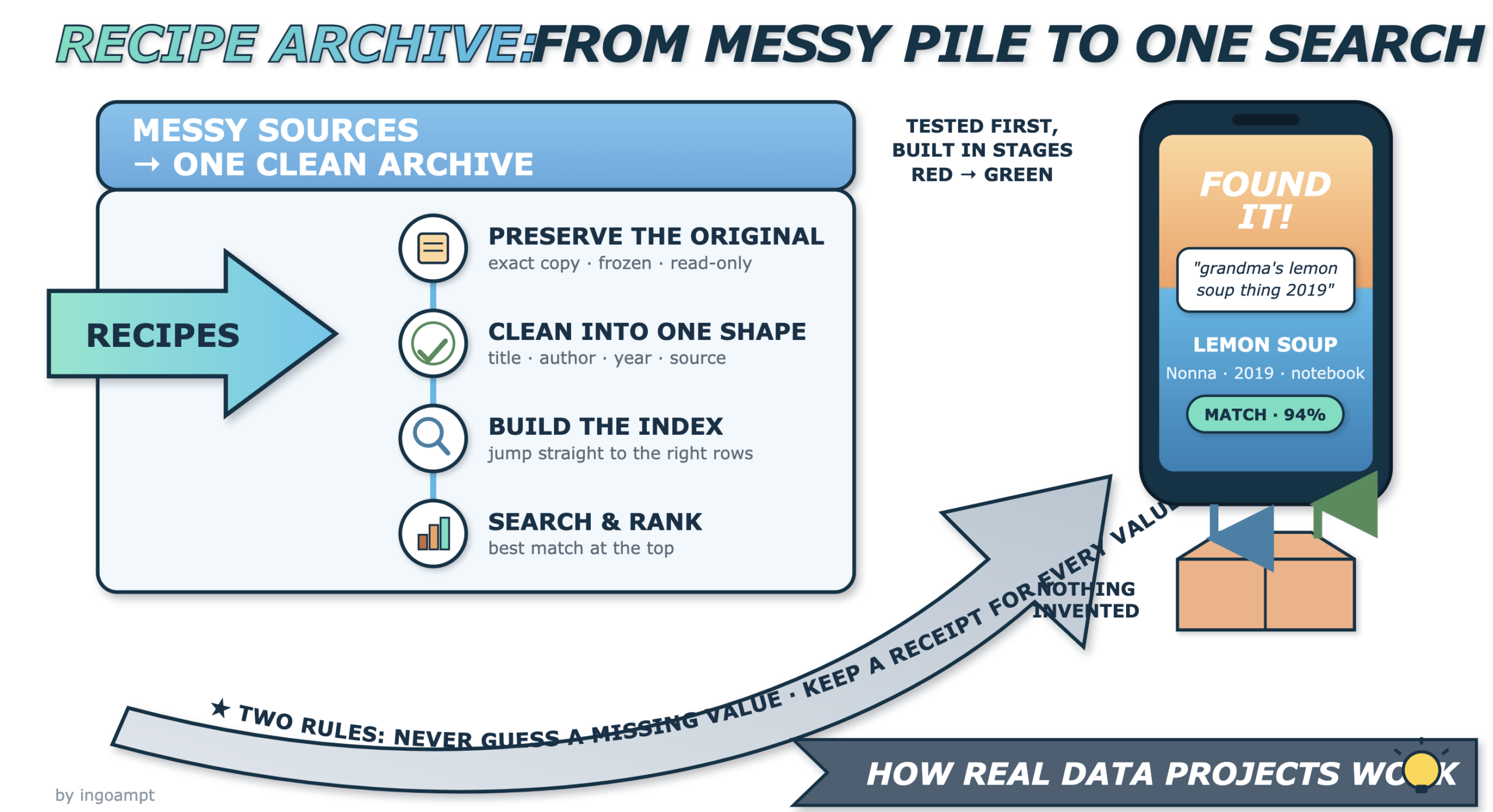
Imagine this. You have just inherited thousands of recipes. Some came from your grandmother’s handwritten notebook, which a cousin typed up years ago. Some came from an old recipe website you exported before it closed. Some came from a supermarket’s cooking app. You dream of one thing: one day you type “grandma’s lemon soup thing from 2019” and the right recipe appears in a second.
But the pile is a mess. Each source names things differently. There are far too many recipes to read by hand. This article explains, step by step and in plain words, why a project like this is built the way it is — and why you cannot jump straight to the fun search part.
1. Why big projects are built in stages
Plain definition: a large project is split into small ordered steps, where each step stands on the one before it. You finish and check one step before starting the next.
The search box is the taps. It is the exciting part. But search needs clean, consistent recipes underneath it, and those need a safe copy of the original mess underneath them. Skipping ahead feels faster but usually means tearing everything out and starting again. Building in small increments also lowers risk: if step two has a bug, you find it while the project is still small and cheap to fix, instead of at the very end.
2. Keep the original messy data, untouched forever
Plain definition: the very first step is to copy the original data exactly as it arrived — every typo, every weird column name, every blank — and then never change it again. It becomes read-only.
In data work this untouched first copy is often called the raw layer. In Databricks’ widely used medallion architecture it is the “bronze layer”, whose job is to ingest raw data with, in their words, “no data cleanup or validation performed here.” The bronze layer deliberately captures everything from external source systems without transformation, precisely because that enables you to “replay” the pipeline and keep full data lineage. You can always rebuild from it if a cleaning rule turns out to be wrong. That safety net is the whole point.
from_cookbook. The website export used website_name. You copy both in exactly, ugly names and all, into raw tables. You do not rename anything yet. That happens in the next step, in a different place.3. A second, clean table (the “one shape” idea)
Plain definition: instead of cleaning the original in place, you create a new table and write tidy, standardized rows into it. You read from the raw table and write into the clean table — both living in the same database file. The raw table is never modified.
Why a second table? Because every source describes the same idea with a different label. One source stores the source of a dish under from_cookbook, another under magazine, another under website_name. A single search box cannot look in a hundred differently-named fields. First you must reshape everything into one agreed shape with shared columns like title, author, year, source_name, and category.
Here is the same idea as a tiny before/after table. Notice how three different column names all become one shared column.
| Source | Original field name | → Clean column |
|---|---|---|
| Grandma’s notebook | from_cookbook | source_name |
| Website export | website_name | source_name |
| Supermarket app | magazine | source_name |
The key rule: data is READ from table 1 (raw) and WRITTEN into table 2 (clean). Both tables sit in the same single database file. Table 1 is never touched. This means the clean layer can be deleted and rebuilt any time, because the raw truth is safe.
4. Why the clean table still isn’t fast (and what an index is)
Beginners often think: “Now the data is clean, so search must be fast.” Not yet. A clean table makes fast search possible, but it does not make it fast. Speed comes from a separate later step called an index.
Plain definition: an index is an extra, sorted helper structure the database builds so it can jump straight to matching rows instead of reading every single row.
Now the crucial confusion to clear up. You cannot build one good index over many inconsistent shapes. An index on the column source_name only works if every row actually has a source_name. If some rows call it magazine and others website_name, there is nothing single to index. So the order is forced:
Index = makes search FAST (jump straight to the row).
You must do them in that order.
5. Add recipe types one at a time
Plain definition: you clean one kind of item first, get it perfect, then add the next kind — because each kind has slightly different rules.
Recipes are not all the same. A main dish usually names the cookbook it came from. A drink might name no source at all. A chapter of a baking book lives inside a bigger book. A menu is a container of several recipes — it is not itself a recipe. If you tried to cram all of these into one rule at once, you would get a tangle of mistakes.
| Source type | Clean type | Special rule |
|---|---|---|
| Main dish | recipe | Must have a source_name |
| Drink | recipe | source_name may be empty |
| Baking-book chapter | recipe | Links to a parent book id |
| Menu | collection | Holds many recipes; is not a recipe |
Handling types in small groups keeps each rule simple to write, simple to test, and simple to fix.
6. The “never guess” rule
Plain definition: if a value is missing in the source, the clean row must stay empty — a real database NULL that means “we do not know.” You never invent a value, never write “unknown,” never write 0, and never copy a neighbour’s value to fill the gap.
This matters because three things that look similar are completely different:
- NULL — a marker meaning “no value recorded / unknown.” It is not a number and not text.
- Empty string (
"") — a real piece of text that happens to have zero letters. It means “we know it is blank.” - Zero (
0) — a real number. It means “the amount is zero.”
2019, later a search for “2019 recipes” returns dishes that were never from 2019. The fake value spreads silently into every report and every search result, and nobody can tell the real years from the invented ones. A NULL is honest: it says “we do not know,” and honesty is rebuildable.2019 from the card above it. Right: leave year as NULL. Later, if the notebook’s date is discovered, you can fill it in truthfully.7. Keep a receipt for every value (provenance)
Plain definition: provenance (also called data lineage) means recording, for every cleaned value, where it came from and which rule shaped it. It is a receipt that lets you trace any clean value back to its origin.
For each clean value you record something like: “source_name = ‘Nonna’ came from the notebook’s from_cookbook field, transformed by the rule trim-and-title-case.” This makes results auditable (you can prove why an answer is what it is), and it lets you rebuild or correct data later without guessing what you did the first time.
8. Automated tests and pytest
Plain definition: a test is a small program that checks whether another program does what you expect. An automated test runs by itself, in seconds, with no human watching.
You cannot check millions of cleaned recipes by hand — you would still be reading them next year. A computer can check them all in seconds. In Python, the most popular tool for this is pytest. A pytest test is simply a function whose name starts with test_ that calls your code and then asserts the answer is correct.
def clean_source_name(raw):
    return raw.strip().title()

def test_clean_source_name():
    # tiny, made-up example
    assert clean_source_name("  nonna ") == "Nonna"
If the answer is right, the test passes (you see green). If not, pytest prints exactly what it expected and what it got, so you know instantly that something broke.
9. Write the test first: red, green, refactor
This is the idea beginners find strangest, so let’s go slowly. In Test-Driven Development (TDD) you write the test before you write the code — and you want to see it fail first.
TDD was popularised by software engineer Kent Beck in his 2002 book Test-Driven Development: By Example (Addison-Wesley). In its preface he lays down a strict first rule — “Write new code only if an automated test has failed” — and a three-word rhythm. In Beck’s own words (preface, p. x): “Red—write a little test that doesn’t work, perhaps doesn’t even compile at first. Green—make the test work quickly, committing whatever sins necessary in the process. Refactor—eliminate all the duplication created in just getting the test to work. Red/green/refactor—the TDD mantra.”
Another way to picture it: you write the exam questions before the lesson. First everyone fails (red) — that proves the exam actually tests something. Then you teach until everyone passes (green). Then you tidy the lesson without changing what it teaches (refactor).
10. Fake data and tiny throwaway test databases
Plain definition: tests use small made-up records and a temporary database that disappears afterwards, instead of the real huge collection.
Why not test against all the real recipes? Three reasons: speed (a handful of fake rows checks in milliseconds), repeatability (made-up data never changes, so the test gives the same result every time), and safety (you cannot damage the real collection if you are not touching it).
A common trick is an in-memory SQLite database — a whole database that lives only in memory and vanishes when the test ends. In pytest, reusable setup like this is called a fixture, and the built-in tmp_path fixture even hands you a fresh temporary folder that is cleaned up automatically.
import sqlite3, pytest

@pytest.fixture
def tiny_db():
    con = sqlite3.connect(":memory:")   # throwaway, in memory
    con.execute("CREATE TABLE clean(title TEXT, year INT)")
    yield con                           # give it to the test
    con.close()                         # cleaned up after

def test_insert_recipe(tiny_db):
    tiny_db.execute("INSERT INTO clean VALUES ('Lemon Soup', 2019)")
    rows = tiny_db.execute("SELECT COUNT(*) FROM clean").fetchone()
assert rows[0] == 111. All-or-nothing writing (transactions)
Plain definition: a transaction groups several database writes into one unit that either all happen or none happen. This all-or-nothing rule is called atomicity — the “A” in the four ACID properties (Atomicity, Consistency, Isolation, Durability), a term coined by Theo Härder and Andreas Reuter in their 1983 paper “Principles of Transaction-Oriented Database Recovery.”
COMMIT). If the phone rings and you get interrupted halfway, you rub out the pencil (ROLLBACK) — no half-inked, half-wrong card survives. Or think of a shopping basket: you either check out the whole basket or abandon it; you never pay for half your groceries and leave.Why this matters: cleaning one recipe might mean writing several rows (the recipe, its ingredients, its provenance receipts). If the program crashes after writing two of three rows, a transaction guarantees the database rewinds to before you started — so you never get a half-finished, broken recipe. A savepoint is a marker inside a transaction you can roll back to partly, without throwing away everything.
12. Adding a column later, safely (migrations)
Plain definition: a migration is a small, numbered file that makes one change to the database’s structure — like adding a new column — instead of rebuilding the whole database from scratch.
Months in, you realise you want a new column, say difficulty. You do not tear the database down. You write a tiny migration file such as 003_add_difficulty.sql:
-- migration 003
ALTER TABLE clean ADD COLUMN difficulty TEXT;
Files are numbered (001, 002, 003 …) so they always run in the same order, on every computer, and everyone can see exactly what changed and when. (Tip: pad the numbers — 001 not 1 — so they still sort correctly once you pass file number 10.)
13. Backups and read-only protection
Plain definition: before any big write, you make a safe copy (a backup) and mark the original as read-only so it cannot be changed by accident.
Because a SQLite database is just a single file on disk, backing it up is as easy as copying that one file — you can even email it or drop it in version control. (The single-file design is so durable that the US Library of Congress lists SQLite as a recommended format for long-term preservation of digital content.) But a copy in the same place is not really safe.
14. The counting final exam (reconciliation)
Plain definition: reconciliation means checking that the totals after processing match the totals you measured at the very start. If you began with 8,000 raw recipes, you should be able to account for all 8,000 afterwards.
Here is the subtle part: a single grand total can hide errors. Imagine a bug drops 100 drinks but a different bug duplicates 100 main dishes. The grand total is unchanged — it still says 8,000 — so it looks perfect. Only when you count per category do you see drinks are 100 short and main dishes are 100 too many.
This is why reconciliation checks totals per category, not just one big number. It is the project’s final exam: if the counts do not add up, something in the cleaning went wrong and must be fixed before you trust the data.
15. Write it down and check it in (the project diary)
Plain definition: after each finished step you write a short note of what you did and save (“commit”) it, so the work is recorded at a safe checkpoint.
Committing each finished step also gives you checkpoints to return to. If a later change breaks something, you can look back at the diary, see what the last known-good state was, and continue from there with confidence.
16. The whole journey, start to finish
Put it all together and the road is clear. Each stop makes the next one possible:
- Preserve — copy the messy sources exactly and freeze them (raw layer).
- Clean / canonical — read raw, write one shared shape into a new clean table, never guessing, keeping receipts.
- Index — now that there is one shape, build the index that makes lookups fast.
- Search — let people type words and find matching recipes.
- Rank — put the best matches at the top.
- Measure — count and reconcile so you trust the results.
At the end of that road, you finally get your wish: you type “grandma’s lemon soup thing from 2019” and the right recipe appears — fast, trustworthy, and traceable all the way back to grandma’s untouched notebook page.
Conclusion
None of these steps are red tape. Each one removes a specific danger: losing the original, mixing up shapes, inventing fake facts, breaking things silently, or trusting numbers that do not add up. The reason you cannot skip to the search is simple — search is the tap, and taps need pipes. Build the plumbing in order, test as you go, keep the original safe, and never guess. Do that, and the fun part works the very first time you turn it on.
Frequently asked questions
- Why keep the messy original at all — isn’t cleaning it enough?
- Because every cleaning rule might be wrong. The frozen original is your safety net: you can always rebuild the clean data from it. If you throw the original away, a mistake becomes permanent.
- What is the difference between a clean layer and an index?
- The clean layer makes search possible by putting everything into one shape. The index makes search fast by letting the database jump straight to matching rows. You need the shape before you can build a useful index.
- Why write a test before the code exists?
- So you can watch it fail. A failing test proves it can actually detect a missing feature. A test that passes before you write any code is probably checking nothing.
- Why use fake data instead of the real recipes in tests?
- Fake data is small (tests run in seconds), unchanging (same result every time), and safe (you cannot damage the real collection). A throwaway in-memory database vanishes when the test ends.
- What does “never guess” really mean?
- If a value is missing, leave it as
NULL(“unknown”). Do not write0, do not write “unknown” as text, and do not copy a neighbour’s value. A guessed value spreads silently into every search and report. - Why count per category and not just one grand total?
- Because a grand total can hide compensating errors — 100 lost in one category and 100 added in another cancel out. Per-category counts reveal the hidden mistake.
- Do I need a huge database system for this?
- Not to start. A single-file database like SQLite holds your raw and clean tables in one file you can copy or back up easily, which is plenty for a personal recipe archive.