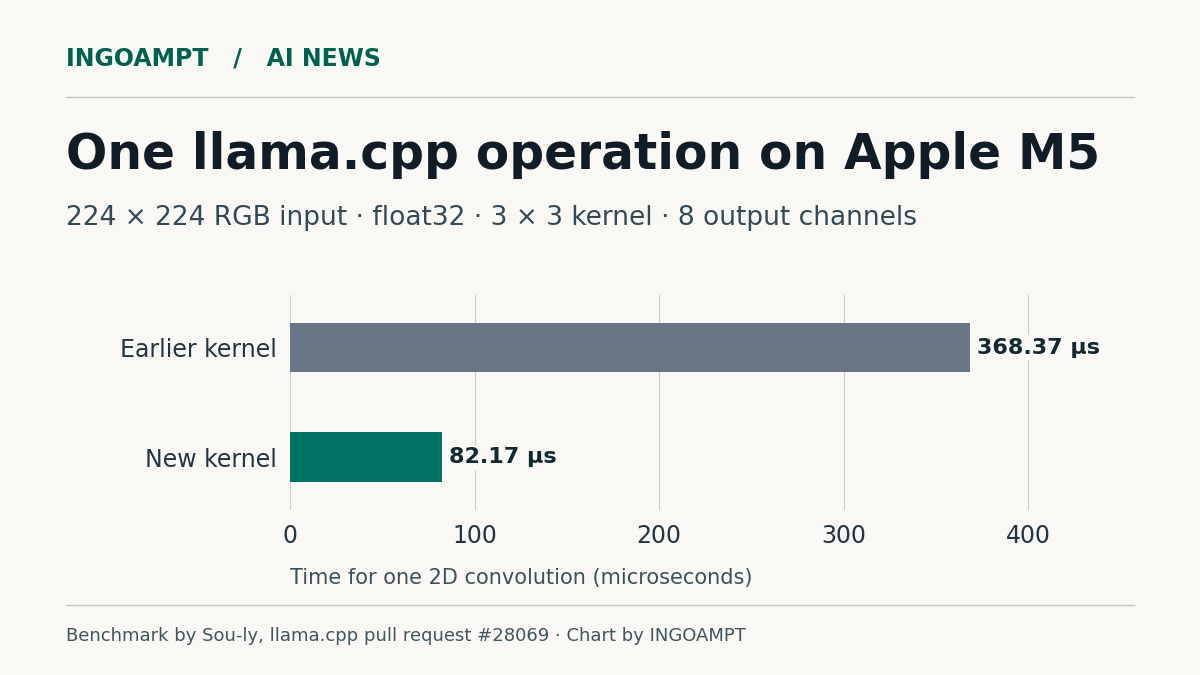
The November 17 prerelease of llama.cpp gives Apple Silicon developers a faster way to run a calculation used in vision and audio models. In one Apple M5 test, processing a 224 × 224 RGB input took 82.17 microseconds, down from 368.37. The change is available in llama.cpp build b12469, which includes an Apple Silicon macOS build and an iOS XCFramework.
Which apps benefit from the Metal change?
The release speeds up two-dimensional convolution. Imagine a small filter sliding across an image, multiplying and combining nearby pixel values. A vision model can repeat that calculation across many positions and channels to pick out patterns. Some audio decoders also use convolutions to turn a model’s internal representation back into sound.
The new Metal code arranges that work into blocks that supported Apple GPUs can multiply efficiently. The old path remains available for hardware without the required matrix instructions. A developer who runs Gemma 3n for image input has a concrete reason to try the build. A maintainer identified its vision encoder as an existing user of this operation. A text-only chat app would need evidence that the changed operation appears in its workload before expecting a gain. Implementation, benchmark and maintainer review.
What the 4.48× result measures
For the example in our chart, contributor Sou-ly timed one float32 convolution with a 3 × 3 filter and eight output channels. Dividing 368.37 by 82.17 gives a 4.48-fold speedup for that operation. The same table includes a smaller case that improved by 2.20 times. Input shape matters even on the same chip.
How much could a user notice? Suppose an app takes 100 milliseconds to answer and spends 20 of those milliseconds on the operation. At 4.48 times the speed, that stage would take about 4.5 milliseconds. If everything else stayed the same, the user would wait roughly 84.5 milliseconds. This is an illustration of how to read the benchmark. The published measurements came from the project contributors.
One reviewer also timed a larger piece of work. On an M5 Max, the ACE-Step audio decoder took 1.9 seconds to decode three 87-second clips with the new kernel, compared with 6.3 seconds on the matrix-multiplication path used for comparison. That timing covers audio decoding. Generating a finished track involves other stages.
A useful upgrade check
If your app already ships llama.cpp, keep the current build and b12469 side by side. Run the same model on the same image or audio sample with identical settings. Check that the outputs agree, then measure the operation and the user-visible wait separately. A shorter wait for the first usable result is a stronger reason to ship a prerelease than the fastest number in a kernel benchmark.
If you are choosing hardware for a new app, first check which runtime supports your model. Our guide to Apple MLX, NVIDIA CUDA and AMD ROCm compares memory limits, software compatibility and when renting a GPU makes sense.
Chart credit: INGOAMPT, from Sou-ly’s Apple M5 measurements in llama.cpp pull request 28069. For more reporting on local models and the tools that run them, visit INGOAMPT AI News.