

AI Chat by API for iPhone & iPad
INGOAMPT iOS apps / AI Chat by API
AI Chat by API · by INGOAMPT
AI Chat by API.
Put your text
to work.
Chat through the OpenAI API with your own key. Bring text from PDF and TXT files into your prompts, then copy useful responses into your work.
Paid app download. OpenAI API usage is billed separately. iOS / iPadOS 18.1 or later. Check the details before you download.
On a computer? Open the listing on your phone

Scan with your camera to view AI Chat by API and your local price. Or open the App Store listing.
Extract a passage from a PDF or TXT file.
Turn that passage into a focused prompt.
Copy the result and check it against the source.
Less retyping. More thinking.
Give your next question a starting point.
AI Chat by API brings document text and AI chat into one simple workflow. Use it for a short task when you already know what you want to ask. No coding is needed.
Find the part that matters
Work from a paragraph, notes or a document excerpt. A specific question is easier to check than a vague request to explain everything.
Make the request precise
Ask for a short summary, a simpler explanation or an action list. Add the length, audience and format you need.
Review, then copy
Compare names, dates and numbers with your source. Copy the useful text into your own notes or draft.
A better first prompt
What would you like to do with your text?
Choose an idea to reveal a prompt you can adapt. These are writing examples; this page does not upload a file or send an AI request.
Get the main points
Summarize the text below in five short bullet points. Keep the key dates and numbers. Use only information in the text.
Then add the excerpt you want to work with.
Make an action list
Turn the text below into an action list. Include owners and deadlines only when stated. Mark missing details as unspecified.
Useful for turning a short brief into a draft checklist.
Explain it simply
Explain this passage in plain English for a beginner. Keep the meaning, define technical terms and flag anything unclear.
Check the explanation against the original passage.
See the actual app
A closer look before you download.
Genuine previews from the INGOAMPT App Store listing, optimized for this page. Open an image for a larger view. The listing shows the latest available app details.
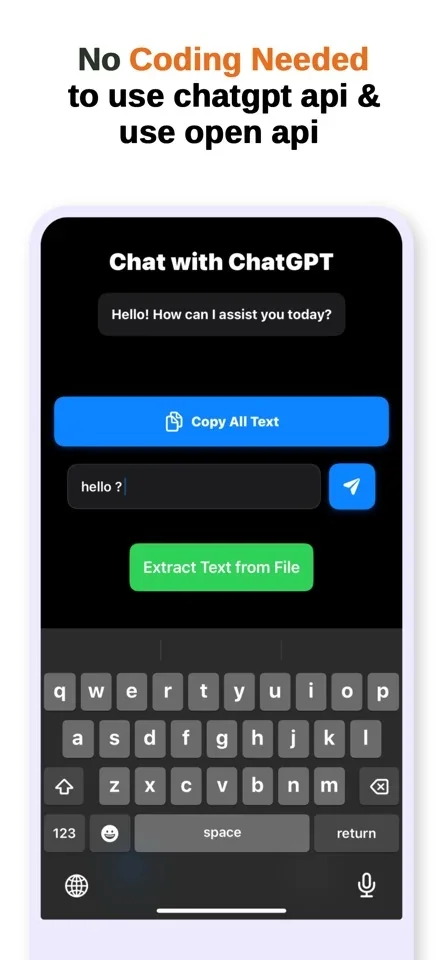
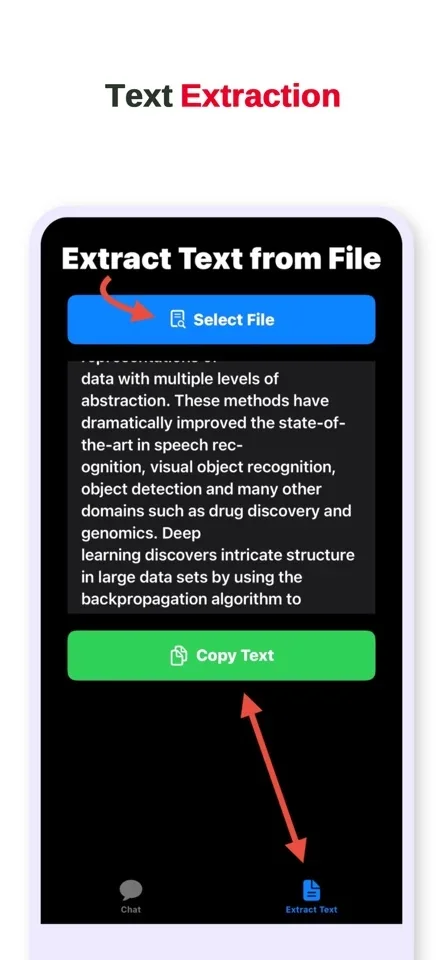
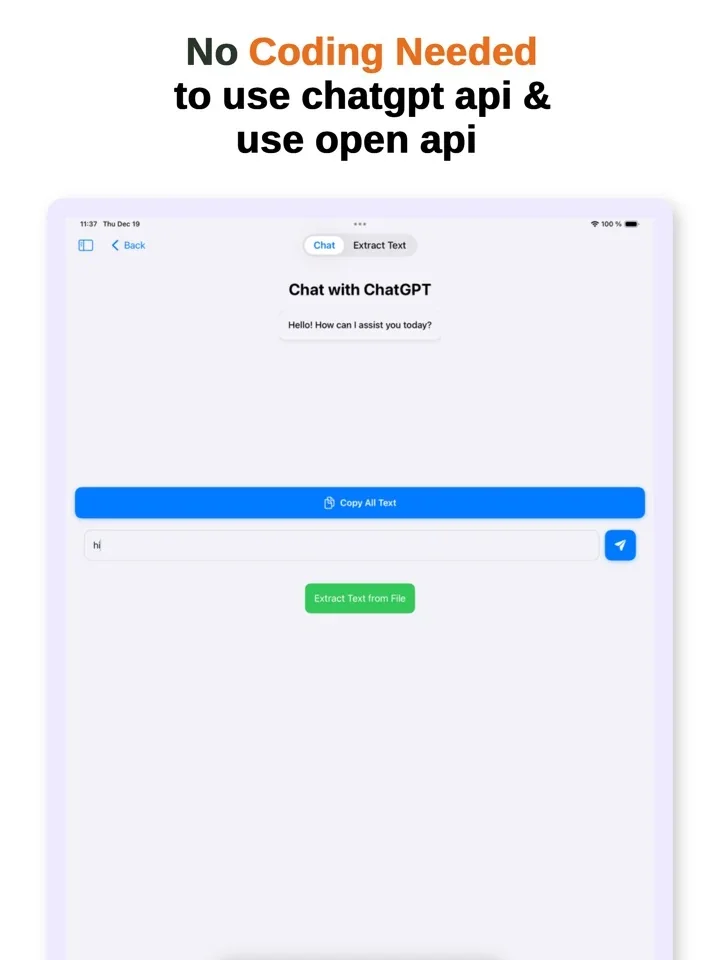
Original image and walkthrough
You can still view the original App Store promotional image or watch the original walkthrough on YouTube. The older video and promotional copy use “ChatGPT Plus” wording. AI Chat by API uses OpenAI API access, which has separate billing and features.
Three things to know
Bring your key. Start with one small task.
You need a compatible device, internet access and an OpenAI API account with access to the service the app uses. API keys come from OpenAI; the app does not supply one.
Check the app listing
Review your device compatibility, local download price and the current version before purchasing.
Prepare your API access
Use your own OpenAI account to obtain a key and review API access, billing and usage. OpenAI API platform · Official billing explanation.
Connect in the app
Enter your key in AI Chat by API. Start with a short prompt or a small document excerpt, review the answer and check usage in your OpenAI account.
Keep your API key private. Never paste it into a document, public chat or support message. For AI answers, verify important facts before relying on them.
Clear costs. Clear expectations.
One app purchase.
Separate API usage.
AI Chat by API is an independent INGOAMPT app that connects to OpenAI’s API. ChatGPT subscriptions and API billing are separate. API access does not provide a ChatGPT Plus membership.
What you pay for
The app: Apple displays the download price for your country before purchase.
The API: OpenAI handles usage charges separately. Costs vary with the model, input, response length and applicable rates.
For occasional work, usage-based access can be useful. Compare your expected usage before deciding; savings are not guaranteed.
Read current OpenAI API prices. The app’s listed features and model access are different from the ChatGPT product.
- App
- AI Chat by API
- Developer
- INGOAMPT · DI Pegah Tafvizi
- Devices
- iPhone and iPad
- Requires
- iOS / iPadOS 18.1 or later; internet and your own OpenAI API access for AI chat
- Language
- English
- Category
- Productivity
- Listed version
- 1.0 · 20 December 2024
- Verified
- 12 November 2026 against the official App Store listing
Before you decide
Useful answers,
without the guesswork.
Know what the app does, what it needs and where your text goes.
What does AI Chat by API do?
It is an INGOAMPT app for chatting through the OpenAI API with your own API key. It can extract text from PDF and TXT files and lets you copy extracted or generated text for reuse.
Does it include ChatGPT Plus or API credits?
The app purchase covers the app. OpenAI API access and usage are separate, and API credits are not included in the app purchase. ChatGPT Plus is a separate OpenAI product; the app does not grant a Plus membership.
Which files can I use?
The listing describes text extraction from PDF and TXT files. Results depend on the file’s readable text. OCR for scanned pages, image understanding and unlimited document sizes are not listed features.
Can I chat offline?
AI responses require internet access and a working OpenAI API account. Your request is sent to OpenAI for processing. Offline AI chat is not a listed feature.
Which devices does it support?
Apple lists iPhone with iOS 18.1 or later and iPad with iPadOS 18.1 or later. Check the App Store on your device for current availability and compatibility.
How is my text handled?
Our app privacy policy explains that submitted prompts and document text are sent to OpenAI for AI processing. It states that INGOAMPT does not collect or store chat content or API keys on INGOAMPT servers. Read the policy and OpenAI’s terms before submitting sensitive material.
Which AI models are available?
The App Store listing does not provide a current model-by-model compatibility list. Availability depends on the app version and your OpenAI API access. If a particular model matters to you, contact INGOAMPT before purchasing.
How do I get help before downloading?
Review the App Store listing and the app privacy policy. For a question about the app or its current compatibility, email INGOAMPT at ingoampt@yahoo.com. Do not send your API key or private documents.
AI Chat by API for iPhone & iPad
Start with a document.
Leave with a useful draft.
See the current app details, compatibility and price on Apple.
Paid download · Your own OpenAI API key required · API usage billed separately