
From One Record to Twelve Million: The Complete Guide
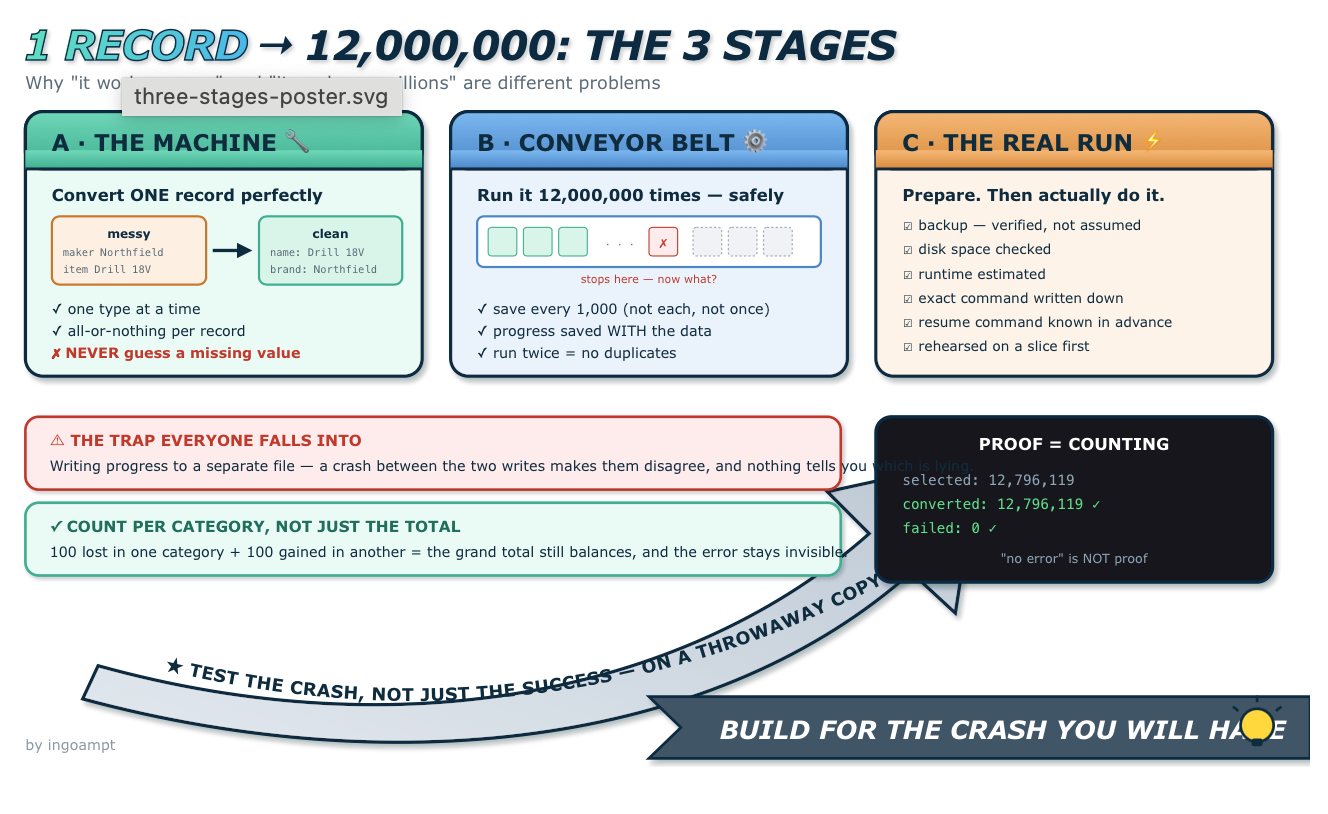
Three stages every large data-conversion project must go through — the machine, the conveyor belt, and the real run. Explained from zero, by ingoampt.
Converting a pile of messy data into a clean, usable form sounds like one job. It isn’t. It’s three, and they have to happen in order. Most projects discover this the hard way: they build the first stage, assume they’re finished, and then spend weeks painfully learning that stages two and three exist.
This guide walks through all three, in plain English, with one simple example carried the whole way.
Stage A — the machine: convert one record perfectly.
Stage B — the conveyor belt: run that machine millions of times without losing anything.
Stage C — the real run: prepare carefully, then actually do it on real data.
The example we’ll use
A warehouse inventory that grew for twenty years across three different systems. Each system named things differently. You want one clean catalogue you can search.
The messy original — one product, split across rows:
| field_name | text | position |
|---|---|---|
| maker | Northfield Tools | 1 |
| item_name | Cordless Drill 18V | 2 |
| added | 2019 | 3 |
| barcode | 5012345678900 | 4 |
The clean result — same product, one tidy row:
| name | brand | year | code |
|---|---|---|---|
| Cordless Drill 18V | Northfield Tools | 2019 | 5012345678900 |
Easy for one product. Now imagine twelve million, across four different product types, each type using slightly different field names.
Building the machine
The first stage produces exactly one thing: a function you can hand a record number, which produces the clean row. No loops. No saving. No progress tracking. Just one record, done properly.
convert_one_record(database, record_number=125)A.1 — Start with one type
Don’t try to handle everything at once. Pick the most common product type and get it completely working, with tests, before touching anything else.
This first slice is more valuable than it looks. It forces you to answer hard questions early, while they’re still cheap: What if the name is missing? What if there are two names? What if the year isn’t a number? Answer those once, on the simplest type, and every later type inherits the answers.
A.2 — Adding more types, one at a time
Real archives hold several kinds of thing, and each behaves slightly differently.
| Original type | Clean type | What’s different about it |
|---|---|---|
| finished product | product | the standard case |
| spare part | product | points to a parent product |
| bundle | container | holds other products; isn’t one itself |
| catalogue entry | reference | not a sellable item at all |
That last row is the dangerous one. A catalogue entry has a name and a brand, so a careless converter files it as a product. Then a customer searches the catalogue and gets back things they can’t actually buy. Giving it a different label keeps it out of normal searches while still preserving it.
Learning to cook, you master boiling an egg before attempting a five-course dinner. One dish at a time, each with its own method, each confirmed working before the next begins.
A.3 — Adding fields, one at a time
Once all the types work with the basics (name, brand, year), you go back and add the finer details. And here the same field name can mean different things depending on the type — which is exactly why they’re added carefully.
| Original field | Clean column | Depends on type? |
|---|---|---|
| item_name | name | no |
| maker (system 1) | brand | yes |
| manufacturer (system 2) | brand | yes |
| supplier_name (system 3) | brand | yes |
| barcode | code (validated) | no |
Three different original field names, one clean column. That absorption happens here, once — so nothing downstream ever has to care which system a product came from.
Some fields carry a nice bonus: a barcode has a built-in checksum, a mathematical self-check. So instead of just copying it, you can verify it. An invalid one isn’t discarded — it’s stored and flagged as unverified, so you never treat a broken code as a trustworthy exact match.
The field that has no good answer
Eventually you hit a field like note, used for wildly different things:
| Note text | Actually means |
|---|---|
| “Discontinued Q3 2021” | a status change |
| “Fragile — handle with care” | a handling instruction |
| “Replaces model 4400” | a relationship to another product |
You cannot write “every note becomes a status” — it would be wrong two-thirds of the time. So notes get their own table, preserving exact text and order, without pretending to understand more than the source actually says. Some fields stay deliberately un-interpreted, and that is a real decision, not a gap.
A.4 — The three unbreakable rules
Rule 1 — all or nothing, per record
Writing one clean product touches several tables: the main row, its categories, its identifiers. If the third write fails, the first two must not survive. Databases handle this with a savepoint — a marker you can rewind to.
Rule 2 — never guess a missing value
If the original has no year, the clean row’s year stays NULL — meaning “we don’t know.”
| You write | It claims | Correct for a missing year? |
|---|---|---|
| NULL | we don’t know | Yes — honest |
| “” | the year is blank text | No — invented |
| 0 | the year is zero | No — invented |
| “unknown” | the year is that word | No — pollutes the column |
A guessed value is indistinguishable from a real one. Six months later nobody can tell which years were genuine and which were filled in. The data quietly stops being trustworthy, and you cannot tell when it happened.
Rule 3 — preserve exact text and exact order
A code stored as 5012345678900 is not “helpfully” reformatted into 501-2345-678900. Contributor 1 stays contributor 1. If you want a cleaned-up version for matching later, you create it separately and label it clearly as derived — never overwriting the original.
A.5 — How each addition gets tested
Every new type and every new field gets the same treatment: write a test that describes the correct result, watch it fail, then write the code that makes it pass.
If a test passes before you write the feature, it isn’t testing what you think. Watching it fail proves the test can actually detect a missing feature — which is what makes the later pass meaningful.
Each addition gets both a positive test (the good case works) and a negative test (the bad case is refused). And crucially, every earlier test runs again. That’s how you find out that adding notes accidentally broke barcodes — instantly, instead of eleven million rows later.
Building the conveyor belt
The machine works. Now run it twelve million times. This is a genuinely different problem, and treating it as “just add a loop” is where projects lose weeks.
B.1 — The loop that looks fine and isn’t
for record_number in all_records:
    convert_one_record(database, record_number)
Reasonable-looking. Also a disaster at scale.
B.2 — The five problems only scale creates
None of these exist for one record. All five appear at millions.
Problem 1 — when to save
Saving is slow. Save after every record and the job crawls; save only at the end and a crash loses everything.
| Save every… | Speed | Lost in a crash |
|---|---|---|
| 1 record | very slow | almost nothing |
| 1,000 records | fast | at most 999 records of work |
| only at the end | fastest | everything |
Groups of around a thousand are a common sweet spot: redoing a thousand records costs seconds, redoing three hours does not.
Problem 2 — knowing where you stopped
Writing progress to a separate file feels obvious: save the data, then write “reached record 4,000,000” to a log. But if the crash lands between those two actions, the file and the database now disagree — and nothing tells you which one is lying.
Problem 3 — running twice must be safe
You will run this more than once — after a crash, after a fix, after a false start. Running again must never produce duplicates. The property has a name: idempotency.
for each record:
    already converted?  →  skip it
not converted yet? → convert itThis also answers “where do I resume?” without being told. Start from the beginning again; finished records get skipped in bulk, and it naturally picks up where it stopped.
Problem 4 — what to do when a record fails
| Approach | Behaviour | Good when |
|---|---|---|
| Stop immediately | first failure halts the run | early — a failure means your rules have a gap and you want to know now |
| Skip and continue | log it, keep going | later, once you trust the rules and expect only rare oddities |
Stopping first is usually right. Discovering a rule gap at record 5,000 is far better than discovering eleven million wrong rows afterwards.
Problem 5 — proving it actually finished
“The program ended without an error” is not proof. Counting is.
selected:   12,796,119
converted:  12,796,119   ✓ match
failed: 0 ✓If 100 products were wrongly filed as bundles, products are 100 short and bundles 100 over — and the grand total is unchanged. It looks perfect. Only a per-category count exposes it.
B.3 — Three tables that solve all five
| Table | Holds | Rows |
|---|---|---|
| runs | one receipt per attempt: start time, settings, how it ended | a handful |
| checkpoints | “safely saved up to record X” | one per group |
| failures | which record failed, at what stage, and why | hopefully zero |
Make them immutable: a retry doesn’t edit the failed run, it creates a new one pointing back at it.
Run A — started 14:25 — FAILED at record 4,200,000
Run B — started 16:00 — retry of Run A — COMPLETED ✓
Both survive forever. You can always reconstruct what happened, instead of finding one row overwritten three times that tells you nothing.
B.4 — Testing a three-hour job in one second
You can’t test a twelve-million-record run by running it. You test the behaviour on tiny throwaway databases with a handful of fake records.
| Test | What it proves |
|---|---|
| convert 5 records | the happy path works |
| run it twice | no duplicates — idempotency holds |
| break record 3 on purpose | records 1–2 survive; record 3 leaves nothing behind |
| kill it mid-run, restart | resumes correctly, doesn’t redo finished work |
| feed it an unknown type | refuses loudly instead of guessing |
| check final counts | the numbers reconcile |
To make a failure happen at exactly the right moment, add a temporary database rule that rejects one specific write. The converter hits it, fails realistically, and you get to watch whether rollback actually works — without waiting for a real crash to happen by luck.
Tests three and four are the ones people skip, and they’re the most valuable. A recovery path you’ve never exercised is a recovery path you cannot trust.
The real run
Everything works on fake data. Now comes the part that actually touches real data — and this is where a different kind of care applies. Up to now, mistakes cost you a rerun. From here, mistakes can cost you the data itself.
C.1 — The readiness checklist
Before pressing start, every one of these gets a verified answer. Not “probably” — verified.
| Check | Why it matters | How to verify it |
|---|---|---|
| Backup exists | the only real protection against everything else going wrong | compare file sizes and checksums, not just “I think I made one” |
| Disk space | a run that fills the disk halfway through fails badly | estimate the growth, check free space, leave generous margin |
| Expected runtime | so you know whether “still going after 2 hours” is normal or stuck | measure a small sample, multiply |
| Exact command | improvising a command at midnight is how accidents happen | write it down beforehand, character for character |
| Interruption plan | laptops sleep, power flickers | know the resume command before you need it |
| Post-run validation | proof, not hope | decide the exact counts you’ll check afterwards |
“I made a backup” is not a verified backup. Check the file size matches, check a checksum, and — ideally — open the copy and count some rows. A backup you’ve never verified is a backup you’re guessing about.
C.2 — Adding tables to a live database
Those three tracking tables from Stage B don’t exist in the real database yet. Adding them is called a migration, and it deserves its own small ceremony.
1. check the database is the expected version
2. check the new tables don't already exist
3. add the tables + indexes
4. update the version number
5. verify everything landed
— all in ONE transaction: works completely, or changes nothingIf your project has a validator that checks “the database should have exactly N tables,” adding three tables makes it reject your database as broken. Update the validator in the same change, or you’ll get a very confusing failure right after a successful migration.
C.3 — The rehearsal
Before the real run, do a smaller one. Take a copy — or a bounded slice — and run the real command against it.
| Rehearsal tells you | Why you want to know beforehand |
|---|---|
| actual speed per thousand records | turns “some hours” into a real estimate |
| how much the database grows | confirms your disk-space margin is real |
| whether resume works on real data | fake data can hide real-world surprises |
| whether any real records are odd | far better to find this now than at hour two |
C.4 — The run itself
Practical things that matter more than they sound:
- Stop the computer sleeping. A laptop that suspends mid-run is the most common interruption of all.
- Log to a file, not just the screen. Terminal windows get closed, scrollback gets lost.
- Watch the first few thousand. If something is wrong, it’s usually wrong immediately. Don’t walk away in the first minutes.
- Then genuinely walk away. Watching a progress counter for three hours helps nobody.
This is exactly what all of Stage B was for. The checkpoint tells you where it got to, the failure table tells you why it stopped, and resuming picks up from the last safe group. An interruption is an inconvenience, not a catastrophe — because you built for it.
C.5 — Proving it worked
The run ending is not the finish line. The verification is.
total converted        = total selected        ✓
per-category counts    = expected per category ✓
failures               = 0 (or all reviewed)   ✓
database integrity     = ok                    ✓
original data          = unchanged             ✓
That last line deserves emphasis. The whole point of a raw layer is that it stays untouched. Confirming it after a big write is cheap, and it’s the difference between believing your safety net exists and knowing it does.
A run that “completed” but whose numbers don’t reconcile has not succeeded — it has failed quietly, which is worse. Counting is the only proof.
Lessons you can reuse anywhere
- “Works on one” and “works on millions” are different problems. Budget time for both.
- Build the machine before the conveyor belt. Don’t wrap batching around unproven logic.
- Add one type and one field at a time. Small changes make failures traceable.
- Never guess a missing value. Empty is honest; invented is permanent.
- Preserve exact text and order. Derived versions are separate and labelled.
- Save in groups, not every record and not only at the end.
- Write progress inside the same save as the data. Separate files drift and lie.
- Make re-running safe. Check-then-skip beats remembering.
- Keep run history immutable. New attempt, new row, linked to the old.
- Test the crash, not just the success. Deliberately, on a throwaway copy.
- Verify the backup before the big write, not after.
- Rehearse on a slice before the full run.
- Prove completion by counting, per category. “No error” is not proof.
FAQ
- Why can’t I just write the loop and be done?
- You can — for a few thousand rows you can simply rerun it. The moment a run takes long enough that redoing it hurts, every point in Stage B starts earning its keep.
- Why not save after every record to be safest?
- Saving is expensive. Doing it twelve million times can turn a two-hour job into a multi-day one. Groups of around a thousand give you most of the safety at a fraction of the cost.
- What does idempotency mean in practice?
- Running the job twice gives the same result as running it once. Concretely: check whether a record is already converted and skip it if so.
- Should one bad record stop everything?
- Early on, yes — it usually means your rules have a gap, and you want to find that at record 5,000. Switch to skip-and-log once you trust the rules.
- How do I test something that takes three hours?
- You don’t run the real thing. Run the same code on a handful of fake records in a throwaway database, and deliberately break it to check recovery works.
- Why keep failed run records instead of cleaning them up?
- The history is the diagnosis. If retries overwrite the failed attempt, you lose the only evidence of what went wrong.
- Is a rehearsal really necessary if all tests pass?
- Yes. Tests use fake data you invented; real data contains things you didn’t imagine. A rehearsal on real records is the cheapest way to meet those surprises early.
- What if the run gets interrupted anyway?
- Then Stage B does its job: check the checkpoint, check the failure table, resume from the last safe group. That is precisely the scenario it was built for.
This article was written by ingoampt.